Keychron
Keychron K5 Max Review
Good
$99.99
Excellent low-profile productivity keyboard — a rare full-size board at 22mm with tri-mode wireless and QMK/VIA. Minor, well-defined compromises: non-shine-through legends, battery variance, and a ghost-press minority. 8.3/10.
As an Amazon Associate we earn from qualifying purchases made through links for Keychron K5 Max.
layout
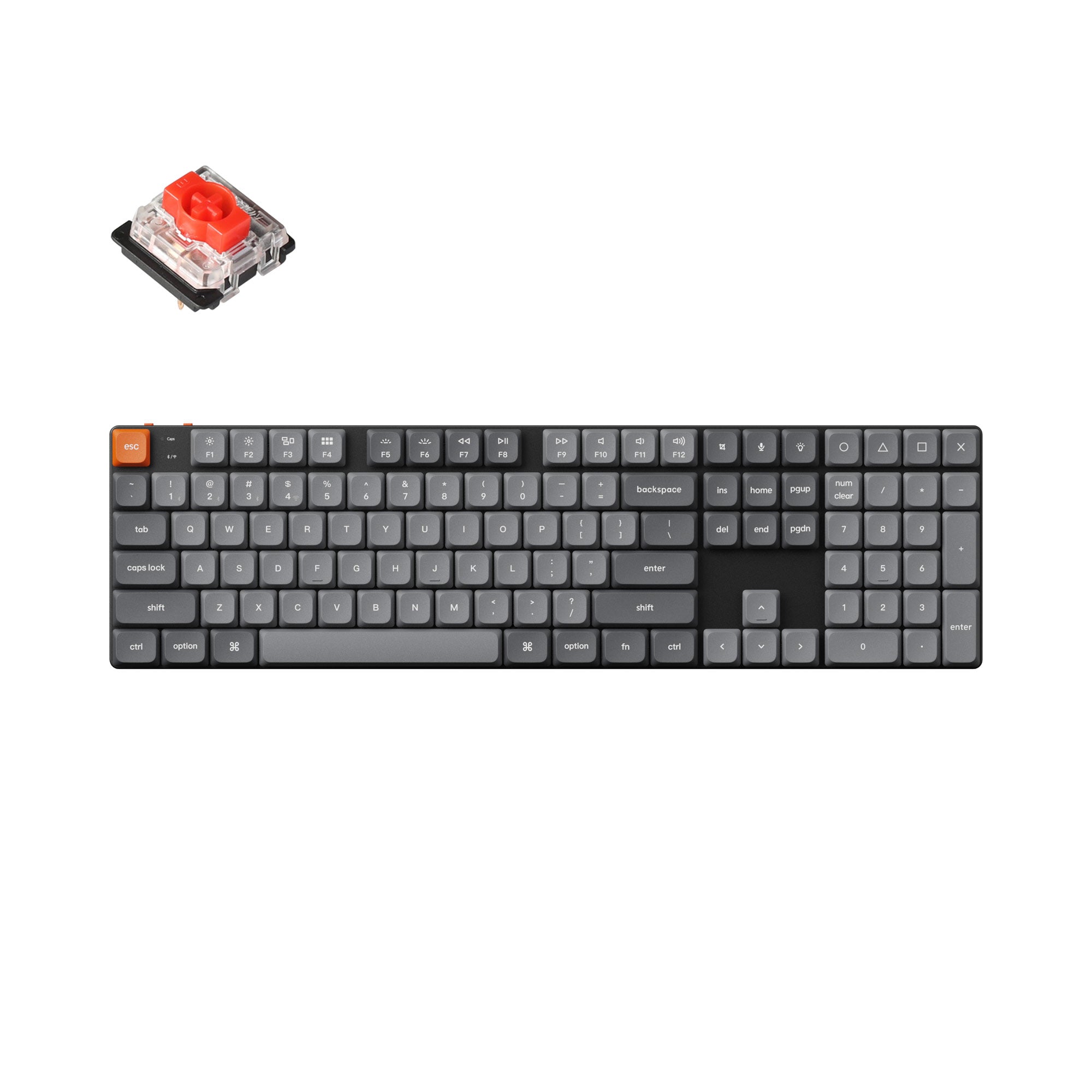
100% full-size (104-key)
switches
Gateron Low Profile 2.0 (Red/Brown/Banana), hot-swap on RGB SKUs
keycaps
Double-shot PBT, LSA low-profile profile
connectivity
2.4 GHz dongle / Bluetooth 5.1 (3 devices) / USB-C wired
Pros & Cons
Pros
- Exceptionally slim full-size design — 100% layout at ~22mm height
- Quiet, refined typing sound from factory-lubed stabilizers and foam damping
- QMK/VIA programmability with onboard storage — no software daemon
- Tri-mode connectivity with stable 2.4 GHz and true 1,000Hz polling
- Native Mac + Windows support with physical toggle and dual keycaps
Cons
- Keycaps have no shine-through legends — backlight glows around letters
- Battery life inconsistent across units, weak with RGB maxed
- Ghost-press reports from a minority of owners — update firmware day one
- No dedicated media keys
Overview
The Keychron K5 Max is the keyboard for people who want mechanical switches without the mechanical bulk. It is a full-size, 100% layout board, numpad included, built around Gateron Low Profile 2.0 switches and an aluminum top plate, and the whole package sits at roughly 22mm tall at its thickest point. In a market where most full-size mechanical keyboards tower over the desk, the K5 Max's entire pitch is that it does not.
That slim silhouette comes wrapped in Keychron's "Max" feature set: tri-mode connectivity (2.4 GHz dongle, Bluetooth 5.1 for up to three devices, and USB-C wired), QMK/VIA programmability through the Keychron Launcher web app, a 2,000mAh battery, and native support for macOS and Windows with a physical OS toggle and extra keycaps for both platforms. It carries an Amazon's Choice badge on its main listing and holds a 4.3-star average across nearly ten thousand ratings, which signals a board that has quietly become one of the default recommendations in the low-profile niche.
It is worth being clear about what this keyboard is not: it is not a tournament-grade gaming board, and it is not trying to be. It is an office-and-everything board, a mechanical keyboard for Magic Keyboard refugees, shared workspaces, and anyone whose wrists object to tall key stacks. Judged against that mission, it largely succeeds.
Build Quality and Design
The defining feature is the low profile. With LSA (low profile spherical-angled) double-shot PBT keycaps over Gateron Low Profile 2.0 switches, the K5 Max measures around 22, 25mm at its highest point depending on whether the feet are extended, closer to a laptop keyboard with a chin than a conventional mechanical. The aluminum top plate gives the chassis a rigidity that belies its slimness; press down on it and there is no flex or creak. Reviewers consistently single out the build quality as excellent for the price tier, and RTINGS' testing rated it among the stronger aspects of the board.
The design is understated in the classic Keychron way: black base, gray keycaps, no logos on the top face. The two-stage flip-out feet offer three typing angles, and the connectivity/OS switches live on the back edge, which keeps the top surface clean. At a bit over a pound, it stays put on the desk but travels fine in a bag.
Two caveats from owner feedback. First, the slim plastic under-body does not feel as premium as Keychron's Q-series full aluminum boards, expected at half the price, but worth knowing. Second, the stabilizers are redesigned for this generation and pre-lubed from the factory; the big keys (spacebar, shifts, enter) land with minimal rattle, which is genuinely impressive at this height, though a small minority of owners report needing to relube after several months.
Key Features
- Gateron Low Profile 2.0 switches, linear Red, tactile Brown, or "Banana" options; the low-profile Gateron design is about 31% slimmer than conventional switches and uses standard low-profile stems, so third-party keycap sets fit
- Hot-swappable PCB on RGB versions, change switches without soldering (white-backlight non-hot-swap versions exist, so check the listing before buying)
- Tri-mode connectivity, 2.4 GHz USB receiver, Bluetooth 5.1 with three-device simultaneous pairing, and USB-C wired
- QMK/VIA programmability via the Keychron Launcher web app, full remapping, macros, and layers, all saved onboard the keyboard so settings persist across machines
- 2,000mAh battery, one of the largest cells in Keychron's low-profile line
- Dual OS support, physical Mac/Windows toggle plus included keycaps for both
- Per-key RGB (or white-only backlight on cheaper SKUs), south-facing LEDs
Performance
Typing feel is the K5 Max's strongest card. The combination of low-profile switches, factory-lubed stabilizers, and internal acoustic foam produces a quiet, consistent, low-pitched sound signature, closer to a good laptop keyboard than a clicky battlestation board. Community feedback repeatedly describes it as "way more silent than I thought," and long-term owners who type all day consistently rank it among the most comfortable low-profile boards available. The low profile also means a wrist rest is optional rather than mandatory.
For gaming, it is competent rather than exceptional. RTINGS measured excellent overall latency on the 2.4 GHz connection with a true 1,000Hz polling rate wired or on the dongle, Bluetooth is the laggard of the three modes. For competitive FPS at a high level, dedicated gaming boards with 8K polling sit a tier above; for everything short of that, the K5 Max keeps up without notice.
Battery life is the mixed bag. The 2,000mAh cell is respectable on paper, and most owners get days-to-weeks of moderate use with backlight off. But the K5 Max family has a persistent minority of battery complaints, owners reporting far shorter runtime than spec, and some who find the board drains noticeably with RGB at full brightness. The realistic expectation: with backlighting off, expect genuinely long stretches; with RGB maxed, expect to charge weekly.
Reliability has one specific soft spot. A recurring thread in owner forums describes "ghost presses", phantom inputs appearing weeks or months into ownership, typically resolved (or not) through firmware updates, pull-up resistor fixes, or replacement. This is not a universal experience by any means, the overwhelming majority of the ~9,900 Amazon ratings are trouble-free, but it shows up enough in community discussion that buyers should buy from a return-friendly retailer and update firmware on day one.
Pros and Cons
Pros:
- Exceptionally slim full-size design, genuinely unique combination of 100% layout and low profile
- Quiet, refined typing sound from factory-lubed stabilizers and foam-damped case
- QMK/VIA programmability with onboard storage, no software daemon required
- Tri-mode connectivity with stable 2.4 GHz and true 1,000Hz polling in dongle/wired modes
- Strong build quality: aluminum top plate, no deck flex
- Native Mac + Windows support with physical toggle and dual keycap sets
Cons:
- Stock keycaps have no shine-through legends, backlight glows around, not through, the letters
- Battery life is inconsistent across units, especially with RGB at high brightness
- Ghost-press reports from a minority of owners; firmware-dependent reliability
- No dedicated media keys; function-layer only
- Not a competitive-tier gaming board, Bluetooth mode latency lags noticeably
Who Should Buy This
This is the board for the all-day typist who wants mechanical switches in a package a coworker won't hear across the room. If you switch between a Mac and a PC, bounce between three Bluetooth devices, and want your macros saved on the keyboard itself, nothing else at this price does all of it in a 22mm chassis. It is also the natural upgrade path from an Apple Magic Keyboard for anyone who wants more feedback without more height.
Skip it if you are primarily a competitive gamer (dedicated gaming boards poll faster and click cleaner), if you need shine-through legends for dark-room typing, or if you want a heavy CNC-aluminum build, Keychron's own Q-series occupies that tier.
Alternatives to Consider
- Keychron K3 Max, the 75% sibling with the same feature set in a shorter footprint; the pick if you don't need the numpad
- NuPhy Air75 V2 / Air96 V2, the other major low-profile contender; slightly better stock keycaps and sound tuning, at a modest price bump
- Keychron K8 Max, same Max feature set at standard profile height; the fallback if low-profile switches feel too shallow
Verdict
The K5 Max earns its Amazon's Choice badge and its place on RTINGS' recommended lists. It delivers a genuinely rare combination, full-size layout, low-profile height, wireless tri-mode, open programmability, and the typing experience is polished enough that most owners stop shopping. The weaknesses are real but bounded: legends that don't light, battery variance, and a ghost-press minority that firmware updates mostly address. At $99, 119 depending on configuration, it is comfortably recommended for work-from-home generalists and multi-device power users.
Score: 8.3/10, Excellent low-profile productivity keyboard with minor, well-defined compromises.
What the Experts Say
Professional review consensus for this product
Full Specifications
| layout | 100% full-size (104-key) |
|---|---|
| switches | Gateron Low Profile 2.0 (Red/Brown/Banana), hot-swap on RGB SKUs |
| keycaps | Double-shot PBT, LSA low-profile profile |
| connectivity | 2.4 GHz dongle / Bluetooth 5.1 (3 devices) / USB-C wired |
| polling_rate | 1000 Hz (wired and 2.4 GHz) |
| battery | 2000 mAh |
| backlight | Per-key RGB or white-only |
| programmability | QMK/VIA via Keychron Launcher web app |
| height | ~22 mm at thickest point |
| os_support | macOS, Windows, Linux |
The Verdict: Good
Excellent low-profile productivity keyboard — a rare full-size board at 22mm with tri-mode wireless and QMK/VIA. Minor, well-defined compromises: non-shine-through legends, battery variance, and a ghost-press minority. 8.3/10.
— GamepadSquire, September 2026
As an Amazon Associate we earn from qualifying purchases made through links for Keychron K5 Max.
Related Buying Guide
Buying Guide
Best Mechanical Keyboards 2026: The Complete Guide for Every Budget
The 2026 mechanical keyboard market mapped tier by tier: from the $37 Keychron C3 Pro and $42 EPOMAKER HE68 Lite to the Wooting 80HE and NuPhy WH80. RTINGS' top picks synthesized with Reddit community consensus, covering mechanical, Hall Effect, and TMR switches for every budget.
Buying Guide
Best Hall Effect Keyboards 2026: The Definitive All-Tier Roundup
Hall effect keyboards went from a $200 Wooting exclusive to a market that spans $42 to $400. This is the definitive all-tier roundup: the best budget, mid-range, and flagship magnetic boards of 2026, ranked by specs, lab data, pro adoption, and community feedback.