Keychron
Keychron K4 HE Review
Excellent
$144.99
The best magnetic keyboard you can buy with a numpad: full-size functionality, 0.2mm actuation, Rapid Trigger, and true 1000Hz wireless at $134.99-144.99. Cramped clusters and Gateron-only switches are the trade-offs. Recommended for numpad gamers and work-play hybrids. 8.5/10.
As an Amazon Associate we earn from qualifying purchases made through links for Keychron K4 HE.
Switch
Gateron double-rail magnetic Nebula, linear (40gf actuation / 60gf bottom-out)
Actuation
0.2-3.8mm adjustable per key (0.1mm steps)
Polling rate
1000Hz (wired & 2.4GHz); ~125Hz Bluetooth
Layout
96%, 100 keys
Pros & Cons
Pros
- Rare 96% magnetic layout: full numpad, F-row, and arrows in a footprint barely wider than a TKL
- Deep magnetic feature set: 0.2mm actuation, Rapid Trigger, Last Key Priority, and up to 4 actions per key
- True 1000Hz polling wired and over 2.4GHz with tri-mode wireless (3 Bluetooth devices)
- Premium build: 1kg+ aluminum-framed chassis with rosewood accents and layered acoustic foam
- Web-based QMK Launcher — no installs, per-key actuation, macros, and onboard profiles
- Editors' Choice consensus (IGN 9/10, Tom's Guide 4/5) at roughly $60 under the Wooting 80HE
Cons
- Hot-swap limited to Gateron double-rail magnetic switches (Nebula, Dawn, Aurora) — no MX or other HE switches
- Cramped 96% layout with no gaps between clusters; mis-hits around arrows and nav keys
- 1000Hz ceiling — no 8K polling for the high-refresh crowd
- Stiff tray-mount feel and firmer 40/60gf switches; some find it tiring for long sessions
- RGB barely visible through Special Edition non-shine-through keycaps; Bluetooth drops to ~125Hz
- Launcher configuration only works wired; a small minority of owners report flaky or repeating keystrokes
Overview
The Keychron K4 HE is the answer to a very specific complaint about magnetic keyboards: almost all of them are tenkeyless. Wooting builds TKLs and 60% boards, and the rush of budget Hall Effect clones mostly stopped at 75%. Anyone who needs a numpad — MMO players, spreadsheet warriors, people who do real work between ranked matches — had to choose between magnetic performance and a full set of keys. The K4 HE is one of the few boards that refuses to make that trade, packing Keychron's magnetic-switch platform into a 96% layout with a full numpad, function row, and navigation cluster.
Launched in early 2025, it's the full-size sibling of the widely praised K2 HE, and it landed with the same Gateron double-rail magnetic Nebula switches wrapped in the same aluminum-framed chassis. The reception has been strong across the board: IGN called it an Editors' Choice with a 9/10, Tom's Guide gave it 4/5 and its Editor's Choice badge, and Windows Central scored it 4/5. On Amazon it holds a 4.4-star rating with an Amazon's Choice badge and a low-returns flag, and on Reddit the sentiment is broadly positive — owners frequently describe it as the best keyboard they've ever used, including one long-time FPS player who credits it as part of the best keyboard-and-mouse combo he's had in 25 years of competitive gaming.
It is not a perfect board. The 96% layout is cramped by design, the switch ecosystem is closed off, and the polling rate stops at 1000 Hz rather than the 8K that hardcore enthusiasts now expect. But at $134.99 for the Standard Edition and $144.99 for the wood-trimmed Special Edition, it undercuts the Wooting 80HE by roughly $60 while delivering most of the same magnetic feature set. For anyone who wants Hall Effect performance without surrendering the numpad, this is currently the best option on the market.
Build Quality and Design
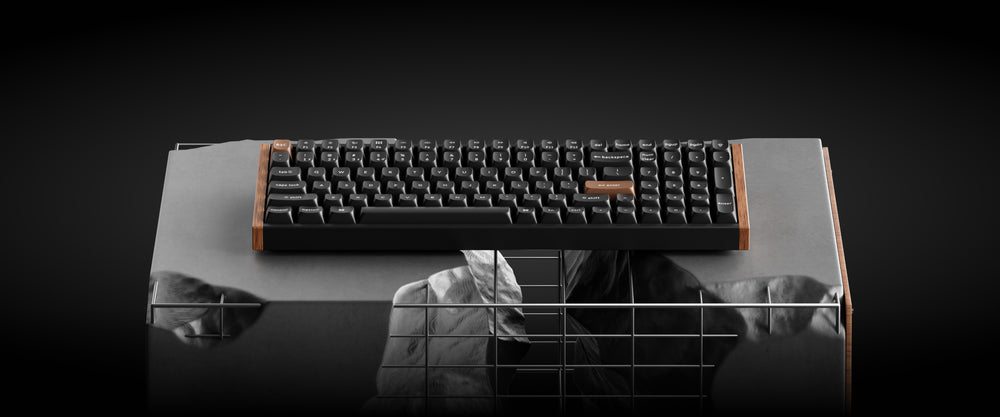
The K4 HE is a substantial piece of hardware. At 1,060 grams it's heavier than it looks — roughly the weight of a 14-inch ultrabook — and that heft translates into a chassis that feels dense and premium. The construction pairs an ABS base with an aluminum top frame, and hands-on reviews consistently note that the board doesn't flex or creak even under deliberate twisting; Notebookcheck's teardown went as far as calling its rigidity better than the far more expensive Wooting 80HE. The Special Edition adds rosewood side panels in two colorways — dark wood on black, light wood on white — which give it a look that fits a modern office as comfortably as a gaming den.
The 96% layout is the defining design decision. At 377.1 × 126.4 mm, the board is barely an inch wider than a typical TKL, yet it crams in 100 keys: the full numpad, a dedicated F-row, arrows, and navigation keys. The cost of that density is that there are no gaps between clusters — it's one solid block of keys, and both professional reviewers and owners report the occasional mis-hit, with IGN's reviewer noting he'd reach for Home when aiming for Delete. The keycaps are double-shot PBT in either OSA profile (Special Edition) or Cherry profile (Standard Edition), and they feel sturdy with a moderate texture. Two-stage flip-out feet offer a choice of typing angles, and the board ships with a genuinely generous accessory kit: keycap and switch pullers, a USB-C cable, a USB-C-to-A adapter for extending the 2.4 GHz receiver, macOS modifier keycaps, and even a screwdriver and Allen key for disassembly.
The one design area where opinions split is the mounting. The K4 HE uses a tray-mounted aluminum plate — Notebookcheck's teardown is explicit about this — which makes the typing feel stiffer than the gasket-mounted boards that dominate the enthusiast market. Combined with the switches' firmer 40-gram actuation and 60-gram bottom-out force, some reviewers describe the board as feeling firm or even harsh under sustained use. Keychron compensates with layers of acoustic foam inside the case, and the sound profile is one of the board's highlights: a creamy, rounded "thock" that multiple reviewers describe as genuinely satisfying to type on. The stabilizers are decently tuned, though, as is typical, the spacebar and other long keys sound slightly different from the rest of the board.
Key Features
- Gateron double-rail magnetic Nebula switches — Linear magnetic switches with 40 gf actuation and 60 gf bottom-out, using contactless magnetic detection (Keychron markets the sensing as TMR-based) for theoretically unlimited lifespan with no metal contact wear.
- Adjustable actuation from 0.2 to 3.8 mm — Per-key, in 0.1 mm increments, so a shallow hair-trigger setup for competitive shooters and a deliberate deep-press setup for typing can live on the same board.
- Rapid Trigger — Each key resets the moment its travel reverses, enabling machine-gun re-presses without waiting for a full release; the reset point is tunable per key.
- Last Key Priority (LKP) and Snap Click — LKP is Keychron's SOCD implementation for counter-strafing at inhuman speed (be aware: anti-cheat systems like CS2's VAC will kick you for exploiting it in matchmaking), while Snap Click lets deeper presses override simultaneous lighter ones.
- Up to four actions per key — Dynamic keystroke programming maps different inputs to different depths of a single press, plus an analog mode that emulates controller stick input with adjustable response curves.
- Tri-mode connectivity — USB-C, 2.4 GHz dongle, and Bluetooth 5.2 with pairing for three devices; true 1000 Hz polling in wired and 2.4 GHz modes, with a dedicated receiver and an extender adapter included.
- Keychron Launcher web configurator — A browser-based, QMK-powered suite (no driver install) covering remapping, macros, RGB, actuation curves, and onboard profiles; configuration requires a wired connection.
- 4000 mAh battery — Rated around 110 hours of use, which is excellent for a backlit wireless board, though real-world runtime drops meaningfully with RGB enabled.
- Hot-swappable switches — But strictly limited to Gateron double-rail magnetic switches (Nebula, Dawn, and Aurora); traditional MX switches and other magnetic families are physically incompatible.
Performance
The K4 HE's performance story is the same one that made the K HE series a success: magnetic sensing that is both fast and precise. RTINGS tested the wider K HE family — the K4 HE is covered in the same review — and rated the platform's raw performance as "amazing," with accurate actuation and reset distances and results that suit gaming at any competitive level. Keychron quotes industry-leading latency within its class, and the 1000 Hz polling over both wired and 2.4 GHz wireless is confirmed by multiple independent tests. The 2.4 GHz mode is genuinely competitive-grade, which is not something every wireless magnetic board can claim.
In practice, the adjustable actuation is the feature that does the heavy lifting. Setting actuation to 0.5 mm — the sweet spot IGN's reviewer settled on for Counter-Strike 2 and Valorant — turns the board into a rapid-fire input device, and the firmer 40/60 gf switch weighting provides a useful side benefit: fewer accidental presses for players with heavy hands, which IGN specifically praised in MMO contexts like FFXIV where fat-fingering a cooldown is catastrophic. The rapid trigger implementation is accurate down to small travel distances, though it's worth noting that some Reddit discussion flags occasional misdetection when actuation is set extremely low — one of the few genuinely negative themes in community feedback. Owners who push 0.2 mm hair triggers report occasional phantom or missed inputs, so the practical sweet spot tends to sit a little higher.
Bluetooth is the clear step down. Notebookcheck measures roughly 125 Hz over BT, which is fine for typing and productivity — and plenty for the three-device multi-pairing setup Keychron is clearly targeting — but it's not for competitive play. Anyone planning to game wirelessly should use the 2.4 GHz dongle, full stop.
Two other performance caveats deserve honesty. First, the polling rate tops out at 1000 Hz; there's no 8K mode, which matters to a shrinking but vocal group of enthusiasts who can perceive the difference on high-refresh displays. Second, reliability: the vast majority of owners report flawless long-term use — Amazon flags the listing as low-returns, and community sentiment is overwhelmingly positive — but a small, persistent minority describe flaky behavior, including keys that repeat or fail to register, and the connectivity feedback on Amazon is mixed rather than uniformly glowing. The 4.4-star aggregate with over a hundred ratings suggests these are outliers, but they're worth knowing about before a purchase.
Pros and Cons
Pros:
- Rare 96% magnetic layout: full numpad, F-row, and arrows in a footprint barely wider than a TKL — the only serious Hall Effect option that keeps the numpad.
- Deep magnetic feature set: 0.2 mm actuation, Rapid Trigger, Last Key Priority, Snap Click, and up to four actions per key, all configurable per key.
- True 1000 Hz polling in wired and 2.4 GHz modes, with tri-mode wireless that pairs three devices over Bluetooth.
- Premium construction: a 1 kg+ aluminum-framed chassis with rosewood accents, layered acoustic foam, and a genuinely pleasant typing sound.
- Web-based QMK Launcher with no installs, plus per-key actuation, macros, and onboard profiles — one of the friendliest software suites in the category.
- Editors' Choice consensus (IGN 9/10, Tom's Guide 4/5) at roughly $60 under the Wooting 80HE.
Cons:
- Closed switch ecosystem: hot-swap only works with Gateron double-rail magnetic switches — no MX-compatible fallback, no third-party HE switches.
- Cramped 96% layout with zero gaps between clusters; mis-hits around the arrows and nav keys are a recurring complaint.
- 1000 Hz ceiling with no 8K polling option, and Bluetooth drops to roughly 125 Hz.
- Stiff tray-mount feel with firmer 40/60 gf switches; some reviewers find it tiring for marathon sessions.
- RGB is barely visible through the Special Edition's non-shine-through keycaps — buy the Standard Edition if lighting matters.
- Launcher configuration only works wired, and a small minority of owners report flaky or repeating keystrokes.
Who Should Buy This
The K4 HE is built for the person who games and works on the same keyboard and refuses to compromise on either. If you're an MMO or RPG player who binds half their abilities to the numpad, a developer or accountant who lives in spreadsheets, or a Mac-and-PC dual user who wants one board across three devices via Bluetooth, this is the magnetic keyboard you've been waiting for. It's also the obvious choice for anyone who wants the rapid-trigger competitive edge without paying Wooting prices — at $134.99 to $144.99, it delivers most of the same performance for two-thirds of the cost.
Skip it if you demand 8K polling, if you're a switch collector who wants to swap in MX or non-Gateron HE switches, or if you're already comfortable on a TKL — in that case the K2 HE gives you the same platform in a roomier 75% layout for a similar price. And if backlit legends are a must-have, avoid the Special Edition and get the Standard version, whose shine-through Cherry-profile keycaps actually let the RGB show.
Alternatives to Consider
- Keychron K2 HE ($139.99) — The same Gateron double-rail platform and software in a 75% layout with conventional cluster spacing. The better pick for TKL fans who want identical performance without the cramped clusters.
- Wooting 80HE ($199) — The gold standard for magnetic keyboards: 8K polling, Lekker switches, and the most mature rapid-trigger software in the industry. Roughly $60 more, TKL-only, and no numpad option.
- Lemokey P1 HE (~$129) — Keychron's gaming sub-brand takes the same Gateron double-rail switches into a gasket-mounted aluminum case with a control knob. More premium feel, but again 75% and no numpad.
- MonsGeek FUN60 Ultra (~$80) — A budget wired magnetic board with rapid trigger for buyers who prioritize price and don't need wireless or a numpad.
Verdict
The Keychron K4 HE is the best magnetic keyboard you can buy with a numpad, and it isn't particularly close. It takes everything that made the K2 HE a community favorite — precise magnetic switches, genuinely useful software, premium build, reasonable price — and applies it to the 96% layout that everyone else in the category ignored. The closed switch ecosystem and cramped clusters are real compromises, and the 1000 Hz ceiling will bother the 8K crowd, but neither undermines what this board is: a full-size Hall Effect keyboard that performs, sounds, and looks far above its price. If you need the numpad and want magnetic performance, stop looking — this is the one. 8.5/10.
What the Experts Say
Professional review consensus for this product
Full Specifications
| Switch | Gateron double-rail magnetic Nebula, linear (40gf actuation / 60gf bottom-out) |
|---|---|
| Actuation | 0.2-3.8mm adjustable per key (0.1mm steps) |
| Polling rate | 1000Hz (wired & 2.4GHz); ~125Hz Bluetooth |
| Layout | 96%, 100 keys |
| Connectivity | 2.4GHz, Bluetooth 5.2 (3 devices), USB-C |
| Battery | 4000mAh (~110 hours rated) |
| Case | ABS chassis, aluminum frame, rosewood accents (Special Edition) |
| Keycaps | Double-shot PBT (OSA non-shine-through SE / Cherry shine-through Standard) |
| Weight | 1060g |
| Dimensions | 377.1 x 126.4 x 40.9mm |
| Software | Keychron Launcher (web, QMK) — config requires wired connection |
The Verdict: Excellent
The best magnetic keyboard you can buy with a numpad: full-size functionality, 0.2mm actuation, Rapid Trigger, and true 1000Hz wireless at $134.99-144.99. Cramped clusters and Gateron-only switches are the trade-offs. Recommended for numpad gamers and work-play hybrids. 8.5/10.
— GamepadSquire, August 2026
As an Amazon Associate we earn from qualifying purchases made through links for Keychron K4 HE.
Related Buying Guide
Buying Guide
Best Mechanical Keyboards 2026: The Complete Guide for Every Budget
The 2026 mechanical keyboard market mapped tier by tier: from the $37 Keychron C3 Pro and $42 EPOMAKER HE68 Lite to the Wooting 80HE and NuPhy WH80. RTINGS' top picks synthesized with Reddit community consensus, covering mechanical, Hall Effect, and TMR switches for every budget.
Buying Guide
Best Hall Effect Keyboards 2026: The Definitive All-Tier Roundup
Hall effect keyboards went from a $200 Wooting exclusive to a market that spans $42 to $400. This is the definitive all-tier roundup: the best budget, mid-range, and flagship magnetic boards of 2026, ranked by specs, lab data, pro adoption, and community feedback.