Best Budget Mechanical Keyboards Under $100 in 2026
Gasket mounts, hot-swap sockets, tri-mode wireless, and even Hall Effect rapid trigger — everything that used to cost $200+ is now standard under $100. We break down the five budget keyboards that dominate 2026 recommendations: Keychron V5 Max, Corsair K70 CORE, AULA F75 HE, ATTACK SHARK R85 HE, and Keychron C3 Pro.
By GamepadSquire — August 2, 2026Verified
Best Budget Mechanical Keyboards Under $100 in 2026
The budget mechanical keyboard market is unrecognizable compared to a few years ago. Gasket mounting, hot-swappable sockets, factory-lubed switches, PBT keycaps, and tri-mode wireless — features that defined $200+ enthusiast boards in the early 2020s — are now the baseline expectation on keyboards that cost less than a night out. Even Hall Effect magnetic switches, once the exclusive territory of Wooting's $200 flagships, have crashed into the sub-$60 tier, and TMR (tunnel magnetoresistance) sensors — the refinement taking over premium controllers — are filtering down to budget boards as well. If you are shopping for a keyboard under $100 in 2026, the problem is no longer finding a good one; it is choosing between a dozen of them.
This guide cuts through the options. It covers the five boards that dominate budget recommendations in 2026 — the Keychron V5 Max, Corsair K70 CORE, AULA F75 HE, ATTACK SHARK R85 HE, and Keychron C3 Pro — based on lab testing data from RTINGS, press reviews, and sustained community discussion across r/BudgetKeebs and r/MechanicalKeyboards. The trade-offs are surfaced up front, because at this price the compromises are what actually decide whether a keyboard works for you.
Quick Picks
| Keyboard | Street Price | Layout | Wireless | Best For |
|---|---|---|---|---|
| Keychron V5 Max | ~$100–110 | 96% | Tri-mode (2.4GHz / BT 5.1 / USB-C) | Best overall — QMK/VIA, gasket feel, near-flagship features |
| Corsair K70 CORE | ~$85 | Full-size | Wired | Best typing feel — pre-lubed switches, sound dampening |
| AULA F75 HE | ~$80 | 75% | Tri-mode | Best wireless Hall Effect — rapid trigger on a budget |
| ATTACK SHARK R85 HE | ~$60 | 75% | Wired (8K polling) | Best budget Hall Effect / rapid trigger |
| Keychron C3 Pro | ~$37 | TKL | Wired | Best value — gasket mount + QMK/VIA under $40 |
Our Top Pick: Keychron V5 Max

If there is one keyboard that defines the ceiling of the budget tier in 2026, it is the Keychron V5 Max. A compact 96% layout squeezes a full number pad into a frame barely wider than a tenkeyless board, and the feature list reads like a $200 custom from three years ago: gasket-mounted plate, QMK/VIA firmware, tri-mode wireless, hot-swap sockets, double-shot PBT keycaps, and a volume knob.
The V5 Max's headline credential is its wireless performance. RTINGS lab testing measured excellent latency over the 2.4GHz connection, with a true 1000Hz polling rate available in both wired and 2.4GHz wireless modes — the same numbers RTINGS cites for far more expensive boards. That makes the 2.4GHz dongle genuinely indistinguishable from a cable for gaming, which is the thing most budget wireless keyboards still get wrong. Bluetooth 5.1 handles up to three devices for office hopping, though Bluetooth is strictly for typing, not competitive play.
The typing experience benefits from the gasket mount and dense sound-dampening foam: softer, springier, and quieter than the hollow clack of older budget boards. Gateron Jupiter switches ship factory-lubed in Red (linear), Brown (tactile), or Banana (a slightly heavier tactile), and the hot-swap sockets accept any MX-style switch, so the board can grow with you. QMK/VIA means remapping, macros, and layers are handled in a browser-based configurator rather than a bloated driver app — a real quality-of-life win over most budget competitors.
Owner feedback is overwhelmingly positive, though it comes with a few honest caveats. The most common complaint across community reports: the south-facing RGB and non-shine-through keycaps make the legends hard to read in a dark room — a minor irritation for gamers who play with the lights off. A smaller number of owners report occasional stabilizer rattle on the big keys, and some note that battery life takes a visible hit when running 2.4GHz with the backlight on continuously. A minority of users have reported Bluetooth or dongle connectivity glitches that firmware updates have generally resolved.
On price, the V5 Max straddles the $100 line: it lists at $119.99 and routinely sells in the $100–110 range, with the barebone kit (no switches or keycaps) undercutting the assembled version further. If your budget is a hard $100, catch it on sale — it dips below regularly — or grab the barebone kit and drop in your own switches. There is a reason RTINGS keeps recommending it across both its budget gaming and budget mechanical lists: nothing else under $100 delivers the same combination of wireless latency, customization depth, and build quality.
Best Typing Feel: Corsair K70 CORE

The Corsair K70 CORE is the budget board that wins on fundamentals instead of spec-sheet stacking. A full-size chassis with pre-lubed MLX Red linear switches, two layers of internal sound-dampening foam, and a programmable rotary dial — for around $85 street, well under its $99.99 list. It is the entry point to Corsair's flagship K70 family, and Corsair's bet was that a great typing and gaming feel matters more than a headline polling number. The press reaction was unusually strong for a mid-range board, with multiple outlets handing it Editors' Choice honors and one reviewer calling it the best typing experience in Corsair's lineup.
The typing experience is the reason to buy it. The factory lubrication makes the linears smooth and consistent across every key, and the dual-layer foam kills the hollow ping that plagues budget mechanicals, producing a deep, quiet "thock" that is pleasant for both gaming and long typing sessions. RTINGS rates its latency as outstanding — at 1000Hz polling with a 1ms report interval, the wired connection adds no meaningful overhead, so in a match this $85 board performs indistinguishably from far pricier hardware. The rotary dial is genuinely useful, and iCUE provides five onboard profiles plus deep per-key RGB for anyone already inside the Corsair ecosystem.
The honest caveats: the cable is permanently attached — a damaged cord kills the whole keyboard, a genuine design sin at this price in 2026. The switches are soldered, so there is no hot-swapping and no switch experimentation. The ABS keycaps will develop a glossy shine in heavy-use spots over time. And a documented double-typing issue affects a minority of early units — Corsair maintains a firmware update and a lot-number-based exchange program for it, so smart buyers check the lot number and update firmware on arrival. Most owners never see the issue, and Corsair has handled it more publicly than most brands would, but it is worth knowing before you buy.
Best Wireless Hall Effect: AULA F75 HE
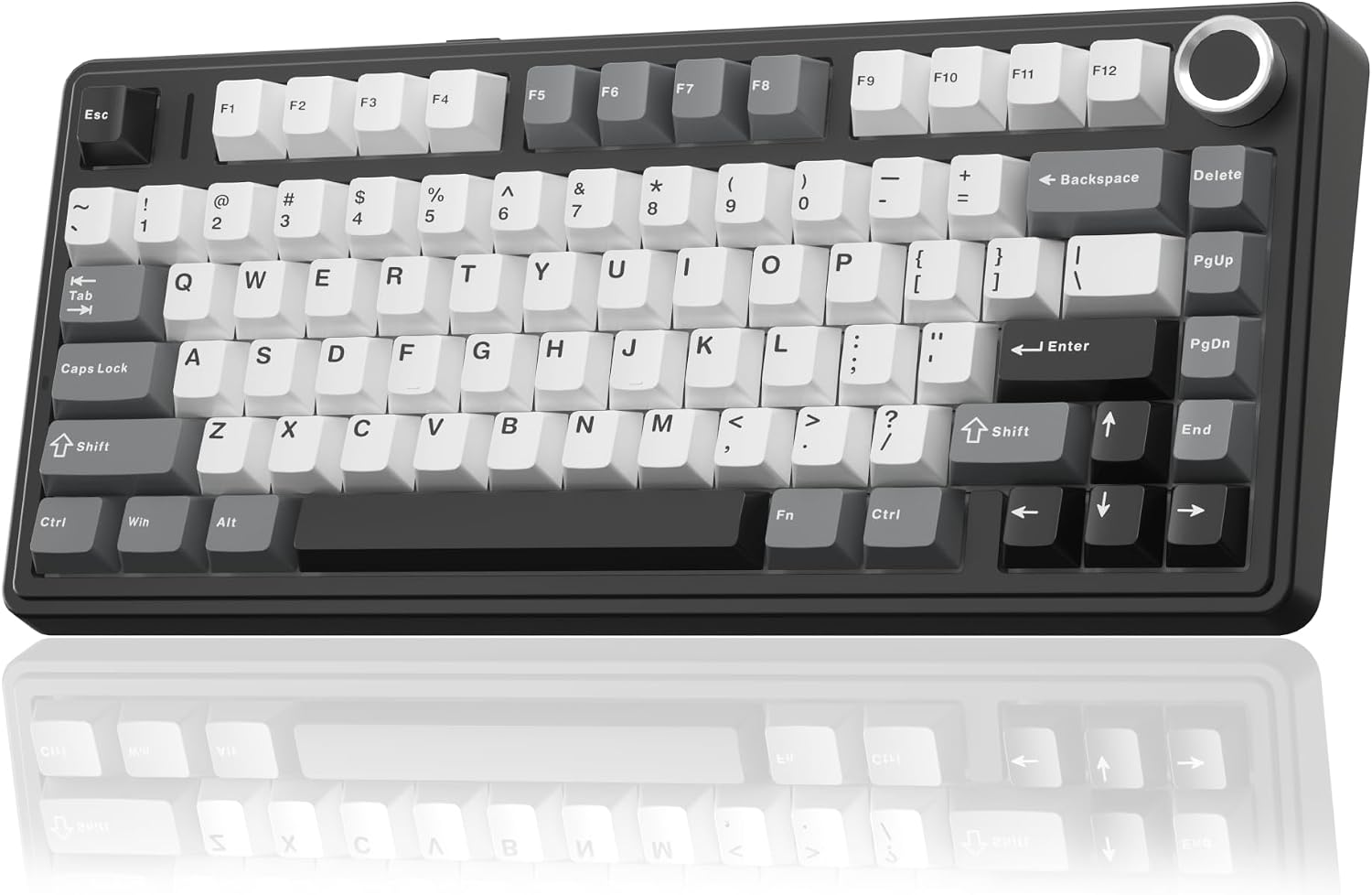
The AULA F75 HE is the magnetic-switch reinvention of the F75, the budget board that became one of the most recommended in enthusiast communities during 2024. AULA took that familiar 75% shell and dropped in Hall Effect switches with rapid trigger, adjustable actuation, and SOCD — the full competitive feature set — while keeping the tri-mode wireless connectivity and 4000mAh battery the mechanical F75 was loved for. At roughly $80, it is the cheapest way into a wireless rapid-trigger board, sitting between the wired value kings and the premium wireless magnetic boards from Keychron and Lemokey.
The competitive features are the real thing, not marketing garnish. Rapid trigger retriggers on the tiniest upward movement of the key, adjustable in 0.01mm steps, and owner reports are unanimous that it works as advertised — light taps register instantly, which is exactly what counter-strafing in Valorant and CS2 demands. Per-key actuation can be tuned across the key travel, SOCD cleaning is supported, and the board polls at 8000Hz over USB-C (1000Hz over 2.4GHz — the fine print on the 8K headline is that it is wired-only, though 1000Hz wireless matches most rivals and is not a competitive liability). The 2.4GHz connection is stable with no reported disconnects, and cross-platform support covers Windows, macOS, iOS, and Android.
The budget origins show in the edges. The case is plastic and lightweight, the acoustics are loud — a sharp, clacky voice that is pleasant rather than cheap but unmistakably too much for a quiet office or shared space — and the standard colorways use opaque keycaps without shine-through legends. There is also a legitimate controversy about the internals: the detailed teardown-style criticism asserts the HE ships with a rigid steel plate and ABS keycaps rather than the mechanical F75's gasket-slot PC plate and PBT, with a stiffer, rattlier feel as a result. AULA's marketing leans on the F75 heritage while the product page stops short of confirming the plate material — anyone buying the F75 HE expecting the identical gasket feel of the original should treat that expectation with suspicion. If you want a genuinely wireless rapid-trigger board without Wooting money, this is the pick; if you want the deep thocky typing feel of the original F75, the wired budget boards below deliver more of it.
Best Budget Hall Effect: ATTACK SHARK R85 HE

The ATTACK SHARK R85 HE is the answer to the question this guide promised to address: are cheap Hall Effect boards actually worth it? In short — yes, if you play competitive shooters, and this is the board that makes the case at around $60. Hall Effect switches use magnets and sensors instead of physical metal contacts, which means no contact wear over time, adjustable actuation points, and rapid trigger (the key re-registers the instant you start releasing it, without waiting for full travel). Attack Shark, a brand that built its reputation on ultra-cheap esports mice, has spent 2026 dragging that technology down toward impulse-buy territory, and the R85 HE is its most complete attempt yet.
Spec-wise it punches far above its price: 8,000Hz polling, 0.005mm rapid-trigger accuracy, per-key actuation adjustable from 0.1mm to 3.3mm, and the full Snap Tap / SOCD / Dynamic Keystrokes suite — the same core rapid-trigger mechanic as a Wooting at roughly a third of the price. The sound profile is the surprise: five layers of dampening under an aluminum plate deliver a deep, creamy "thock" that owners consistently compare favorably to boards costing twice as much. The 75% layout keeps the function row, arrows, and a volume roller, there is a novelty RGB lightbox across the top edge, and onboard memory stores four profiles so settings survive a trip to a tournament PC. Lab testing has confirmed the 8K polling rate and clean N-key rollover with no ghosting.
The honest limitations: it is wired-only, so if wireless is a requirement this isn't it. The configuration software is Windows-first — a web-based driver covers Mac users but the desktop app is Windows-only. And the brand carries reputation baggage: a June 2026 malware scare was convincingly rebutted (the board enumerates strictly as a standard HID device, and no independent researcher corroborated the claims), but the question still cycles through keyboard subreddits, so a security-conscious buyer should know the facts before buying. Quality control is a small lottery — a minority of owners report early failures, with warranty replacements as the fix. For competitive FPS players on a budget, the R85 HE delivers 80% of what a $200 Wooting delivers at under $65. That is an absurd value proposition, and it is the reason this board keeps winning budget roundups.
Best Value: Keychron C3 Pro

The Keychron C3 Pro asks a disarmingly simple question: how much of the enthusiast experience can you get for less than $40? The answer, based on near-universal reception from press and owners alike, is most of it. For $36.99 it packages a gasket-mounted deck, pre-lubed switches, sound-dampening foam, and full QMK/VIA programmability — features that were essentially unheard of at this price when the board launched and that remain rare among budget keyboards today. It is the board that finally retires the Redragon K552 Kumara from the top of the budget list: it costs about the same and delivers a dramatically better feel.
The typing experience is where it punches above its class. The gasket mount and dual-layer foam give the deck a cushioned, slightly bouncy action that is rare below $50, and the pre-lubed red linears are smooth enough that even picky owners report being pleasantly surprised by the stock experience. Sound is a genuine strength — a muted, low-pitched typing tone, quieter than most budget boards. QMK/VIA means every key can be remapped, with custom layers and macros, via open-source firmware and a browser-based configurator — the headline feature, since rivals in the sub-$50 tier almost universally lack it. The one rough edge: VIA does not auto-recognize the board, so first-time users must download a keymap JSON from Keychron and import it through VIA's Design tab. One-time effort, but a real hurdle for less technical buyers.
The trade-offs are the price made visible. The switches are soldered in place — no hot-swapping, so choose red or brown carefully. The backlight is red-only, with no RGB or white option. The ABS keycaps feel smooth and cheap, and most enthusiasts will want to replace them. And the plastic case flexes a bit under firm pressure, with a faint tinny ring on hard keystrokes. None of that matters much at $36.99 — and it frequently sells below $30. It is the default recommendation for anyone on a sub-$50 budget who wants a real mechanical keyboard: gasket-mounted, pre-lubed, fully programmable, for the price of a membrane board.
Are Cheap Hall Effect Boards Worth It?
The short answer: for competitive shooters, yes. Rapid trigger genuinely does something no mechanical switch can — it removes the reset distance from your keypresses, which translates to faster counter-strafing and more consistent peek timing in games like Valorant and CS2. The ATTACK SHARK R85 HE proves the technology works at $60, and the AULA F75 HE proves the wireless version works at $80. The broader market has followed: TMR (tunnel magnetoresistance) sensors, a refinement of Hall Effect, are filtering down to budget boards as well — the MonsGeek FUN60 Ultra TMR brings TMR switches, 8K wireless polling, and a CNC aluminum case to a $90 60% board, though its hidden mode switch and poor wireless battery life keep it a specialist pick rather than a general recommendation.
The honest caveats: standardized, millisecond-level latency testing of budget HE boards is still rare, so spec-sheet claims deserve skepticism. The software layer matters — a budget HE board with bad firmware is just an expensive way to type. And if you play mostly single-player or casual games, the actuation and rapid-trigger features will be wasted on you; a well-tuned traditional mechanical board like the K70 CORE will feel better to type on all day.
If you want the full rapid-trigger experience without the budget compromises, the step-ups are the Keychron K2 HE (wireless, QMK-configurable Hall Effect) and the Wooting 60HE/80HE at the top of the market. But for the majority of players, a $60–80 budget HE board gets you the competitive advantage without the $200 price tag.
Honorable Mentions
Redragon K552 Kumara (~$37) — The most-reviewed budget keyboard by an order of magnitude, and still the answer to "I need a keyboard for $30-something, full stop." A tenkeyless layout with an aluminum top plate, Outemu switches, and the kind of durability that makes it the keyboard people keep as a spare long after they upgrade. It is wired-only, the switches are soldered, the keycaps are thin ABS, and it is loud — but with tens of thousands of Amazon ratings behind it and a street price around $37, it remains a legitimate pick when the budget is a single bill. If you can stretch to the C3 Pro's price, though, you get a dramatically better feel for the same money.
MonsGeek FUN60 Ultra TMR (~$90) — The TMR specialist: a CNC-machined aluminum 60% board with 8,000Hz polling in both wired and 2.4GHz wireless modes, per-key actuation tuning down to 0.01mm, rapid trigger, and a unique MagMech feature that lets you mix magnetic and conventional 5-pin mechanical switches on the same board. RTINGS-measured latency matches boards costing $100 more. The catches: a 60% layout with everything behind Fn layers, a hidden connectivity switch under the Caps Lock keycap that requires a keycap puller to change modes, and battery life measured in hours at 8K wireless with RGB on. Elite FPS value with real compromises.
How to Choose a Budget Mechanical Keyboard
Hot-swap sockets are a strong preference, not a hard rule. A hot-swap PCB means you can replace a broken switch or change the entire switch type without soldering — and three of our five picks have them. But at the very bottom of the price ladder, soldered switches are the trade-off that buys the gasket mount and QMK firmware: the C3 Pro and K70 CORE are both soldered, and both are excellent keyboards. If you plan to tinker, prioritize hot-swap; if you will never open the board, don't pay extra for it.
Switch type matters more than brand. Linear switches (Red-style) are smooth and quiet, best for gaming and most people. Tactile (Brown-style) give a bump at actuation, good for typing feedback. Clicky (Blue-style) are loud — satisfying to some, annoying to everyone within earshot. At this price tier, pre-lubed factory switches have largely eliminated the scratchy feel that used to plague budget boards.
Wireless is now free — mostly. Tri-mode connectivity (2.4GHz + Bluetooth + USB-C) is standard at $50–80. The 2.4GHz dongle is the mode that matters for gaming — Bluetooth is for office hopping. If a board is wired-only in 2026, it needs another reason to exist, like the R85 HE's Hall Effect feature set or the K70 CORE's typing feel.
Layout is a lifestyle choice. 75% is the sweet spot for most people: arrow keys and function row without the bulk. 96% adds a number pad for work use. TKL drops the numpad but keeps the arrows. Full-size keeps everything but takes the whole desk. Pick based on desk space and whether you need the numpad.
Skip the gimmicks. A TFT display or knob is nice-to-have, not a reason to buy. The features that matter are the ones you interact with every keystroke: switches, stabilizers, keycaps, and wireless reliability.
Final Verdict
The sub-$100 keyboard market in 2026 has no bad options among its leaders — it has trade-offs. The Keychron V5 Max is the complete package if you want near-flagship wireless performance and customization depth, and it earns its place as our top pick despite occasionally hovering just above $100. The Corsair K70 CORE is the one to buy for typing feel on a full-size board. The AULA F75 HE is the cheapest way into wireless Hall Effect with the full competitive feature set. The ATTACK SHARK R85 HE brings Wooting-class rapid trigger to the $60 tier. And the Keychron C3 Pro proves you can get gasket mounting and QMK/VIA for less than $40.
Whichever you choose, you are getting features that cost $200+ just a few years ago. The only wrong move is paying $100 for a big-brand gaming keyboard with no hot-swap, no gasket mount, and last generation's switches — every pick here beats that.
Related Guides
Buying Guide
Best Mechanical Keyboards 2026: The Complete Guide for Every Budget
The 2026 mechanical keyboard market mapped tier by tier: from the $37 Keychron C3 Pro and $42 EPOMAKER HE68 Lite to the Wooting 80HE and NuPhy WH80. RTINGS' top picks synthesized with Reddit community consensus, covering mechanical, Hall Effect, and TMR switches for every budget.
Buying Guide
Best Budget Hall Effect Keyboards Under $100 in 2026
Rapid trigger used to mean one thing: a $200 Wooting. In 2026 the sub-$100 tier delivers genuine hall effect gaming — 8K polling, rapid trigger, SOCD — for as little as $42. We rank the five budget magnetic boards worth buying.
Buying Guide
Best Gaming Keyboards Under $100 in 2026
You don't need $190 on a Wooting to get a great mechanical gaming keyboard — hall-effect rapid trigger is now a sub-$100 feature. We rank the best budget boards, from the Ajazz AK820 Pro and Gamakay NS68 to the Corsair K70 CORE and Keychron C3 Pro.