Best Nintendo Switch 2 Accessories 2026: Docks, Cases, Chargers & Screen Protectors
The Switch 2 accessory market is mature in 2026 — and full of compatibility traps. From the amFilm and dbrand screen protectors the press can't stop recommending, to the tomtoc case IGN gave Editor's Choice, to the JSAUX dock that beats the official one at half the price: the accessories that actually matter, and the mistakes to avoid.
By GamepadSquire — August 10, 2026Verified
What Actually Matters in 2026
The Switch 2 shipped in June 2025, and by August 2026 its accessory ecosystem has fully matured — which cuts both ways. The good news: after a year of iteration, the genuinely useful accessories have separated from the cash grabs, and press consensus is unusually consistent about which ones those are. The bad news: this console has more compatibility traps than any Nintendo hardware in recent memory. Old Switch 1 cases and screen protectors don't fit the larger chassis, standard microSD cards are completely useless in the new slot, and the dock now demands a 60W power supply and an Ultra High Speed HDMI cable rather than the older standards. Buy the wrong accessory and you'll discover it the hard way.
Before spending anything, get these four facts straight:
- The Switch 2 only accepts microSD Express cards. Regular microSD and microSDXC cards from the original Switch era will not work — IGN's testing is explicit on this, and it's the single most common accessory mistake new owners make. If you want more storage, you must buy microSD Express.
- The screen comes with a factory film — don't peel it, but do cover it. The Switch 2 ships with a built-in anti-scattering layer that some owners mistake for a removable protector. Leave it in place, then put a tempered glass protector over it. IGN calls a good protector "non-negotiable for handheld devices," and The Verge's testing found the installation process — not the glass itself — is what separates brands.
- Docks need real power. The Switch 2 dock runs on a 60W supply (the original Switch's was 39W) and needs an HDMI cable rated for the higher bandwidth to hold 4K/60 without flicker. Third-party docks are fine, but under-powered ones will reset or drop signal under load.
- Cases and grips now interact with the dock. Many grip cases block the dock entirely, and the magnetic Joy-Con 2 attachment means a case's grips must respect the release mechanism — early dbrand Killswitch 2 units had a detachment flaw that required a free replacement program. Check dock compatibility before buying a grip case.
Everything below has been vetted across owner feedback, community discussion, and professional testing. Prices checked August 2026.
Screen Protectors: The One Purchase Everyone Agrees On
The Switch 2's 7.9-inch 1080p 120Hz display is the console's best feature, and it's the most exposed part of the device. A tempered glass protector is the cheapest insurance you can buy — the only real debate is which installation system you trust and whether you want glossy or matte.
Pick: amFilm Auto-Alignment OneTouch (3-pack)
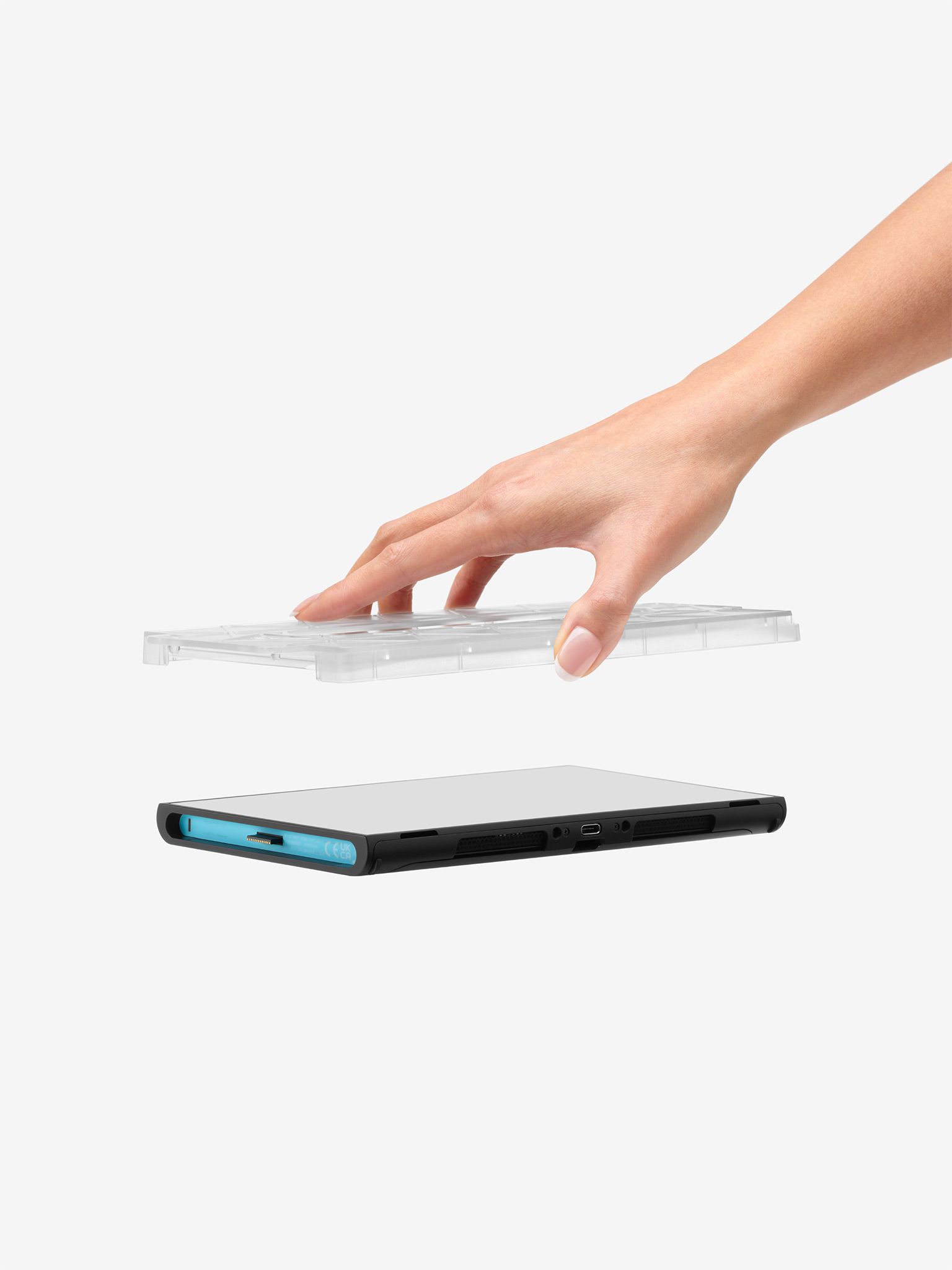
The Verge's top Switch 2 screen protector pick is a three-pack of glossy tempered glass protectors with an auto-alignment tray that makes installation nearly foolproof. The tray snaps over the console, the glass drops into place, and a 30-second press later you're bubble-free — no alignment anxiety, no peeling up the corner to re-seat it. At $9.99 for three, you get spares for the day you eventually crack one, and the 9H glass carries an oleophobic coating that shrugs off fingerprints reasonably well. The Verge's testing notes that once installed, different brands' protectors are almost indistinguishable — so the installation system and the price are the real differentiators, and amFilm wins on both.

Owner feedback across r/NintendoSwitch2 consistently praises the auto-alignment tray — the most common screen protector complaints elsewhere (off-center installs, bubbles, dust trapped under the glass) mostly evaporate when the tray does the positioning. The few negative reviews cluster around the glossy finish being a fingerprint magnet, which is inherent to glossy glass rather than a defect. If glare in bright rooms bothers you, amFilm also sells a matte version of the same kit — just know that matte coatings dull the screen's vividness and viewing angles, which The Verge's head-to-head testing flags as the trade-off.
Premium pick: dbrand Prism 2.0
IGN's top-rated Switch 2 screen protector takes the same foolproof-installation idea and wraps it in dbrand's signature premium presentation. Two protectors come in the box, each nested in a plastic case that clips around the console's edges (Joy-Con 2 removed) for a perfect drop-in fit, plus an alcohol wipe and a bubble comb. At $34.99 it's roughly three times the amFilm, and honestly the glass itself isn't three times better — you're paying for the guaranteed-perfect first attempt and the brand. The Verge calls it "idiot-proof," and community sentiment agrees it's the most forgiving install on the market. Buy it if you want zero installation anxiety and don't mind the premium; buy the amFilm if you want the same outcome for a third of the price.
Cases: Slim Travel Shells vs. Grip Cases
Switch 2 case buyers face a genuine fork in the road: slim zip-up shells that protect the console in transit, or grip cases that stay attached during handheld play. Most owners end up wanting one of each, which is why both categories are worth covering.
Best slim carrying case: tomtoc FancyCase-G05
If you buy one case for the Switch 2, this is the one. IGN awarded it Editor's Choice at 9/10, drop-tested it (the reviewer literally dropped the cased console to check shock absorption — no damage), and called it "the exact case you need." It's a semi-hard shell barely larger than the console itself, with a soft interior, notched cutouts that give the joysticks headroom instead of pressing them flat, and a shock-absorbing cushion protecting the shoulder buttons. The lid holds 12 game cartridges. It's $36.99 list (frequently discounted toward $25), which The Verge notes is not the cheapest option — but its middle-section rigidity beats both the PowerA and Belkin alternatives in direct comparison, and the YKK zipper runs smooth without catching.

The honest complaints: light colorways show dirt quickly (IGN's reviewer noted visible grime after a week in a backpack), and there's no external pocket for cables or an AirTag. For a bare-bones alternative, the PowerA Slim Case at $22.99 is the budget pick — IGN reviewed it as solid and protective, just without the tomtoc's rigidity.
Best grip case: dbrand Killswitch 2
The Verge's 8/10 pick and WIRED's "best grip case" award go to dbrand's Killswitch 2, and it's easy to see why: it makes the Switch 2 feel more like a Steam Deck, which is the highest compliment a handheld grip can earn. The system includes ergonomic Joy-Con 2 grips, a rear cover, a kickstand skin, and a sticker — and it latches on securely enough that nothing feels like it will wiggle off. Crucially, dbrand engineered around the dock problem: a dock adapter extends the USB-C jack so the cased console still fits Nintendo's dock, which most grip cases simply don't.

The caveats are real. The base kit is $59.95 and only covers the back — front protection requires the $79.85 travel tier (adds a bungee-latched front cover and a 10-cartridge tray) or the $100 ultra kit. The dock adapter is chunky and leaves the screen exposed while docked, a compromise The Verge flags. And the launch run had a genuine safety flaw: the original Joy-Con 2 grips could let the console detach if you held it by one controller and shook it. dbrand redesigned the grips and offered free replacements to all owners — a mark against the launch quality, but also the rare case of a company actually fixing the problem properly. New buyers get the corrected grips.
Best travel case with power: Belkin Charging Case Pro
The Belkin Charging Case Pro is the answer to a specific problem: how do you carry the Switch 2 and give it a full charge on the go? This $100 case builds a 10,000 mAh battery into the lid, which doubles as a stand, with a small display showing remaining charge, a removable battery pack for flat packing, 12 cartridge slots, and a pocket sized for a Bluetooth tracker. The Verge tested it and praises the redesign over Belkin's $70 original — the battery is easier to access, the USB-C port is better placed, and it's simply a great protective case regardless of the power feature. The trade-offs are price and weight: with the battery attached it's heavy, and the console charges at a moderate rate rather than fast-charge speeds. For frequent flyers it's the single most useful Switch 2 accessory you can buy; for everyone else, the tomtoc plus a $40 power bank gets you 90% of the value for half the money.

Budget grip alternative: JSAUX Split Protective Case
The Verge's runner-up grip case undercuts the Killswitch massively at $24-30, and it has one party trick the dbrand can't match: the shell is thin enough that the cased console still fits in the official dock. It includes two Joy-Con 2 grips, a transparent back shell, a hard front cover for transit, and 10 cartridge slots. The trade-offs are the expected ones at this price — the grips are smaller and less substantial than dbrand's, build quality is a step down (The Verge's unit had a slight plastic warp near the power button), and the grips exhibit a milder version of the same detachment edge case dbrand fixed. It's a genuinely good value; just don't expect Killswitch-tier engineering.
Docks: Second TV Setup, Done Right
Every Switch 2 comes with a dock in the box, so the dock category is really about two scenarios: adding a second TV, or replacing the official brick with something more portable or more capable. The official dock outputs 4K/60 with the console's upscaling, runs on a 60W supply, and — frustratingly — still has no Ethernet port.
The zero-risk option: Nintendo Switch 2 Dock Set
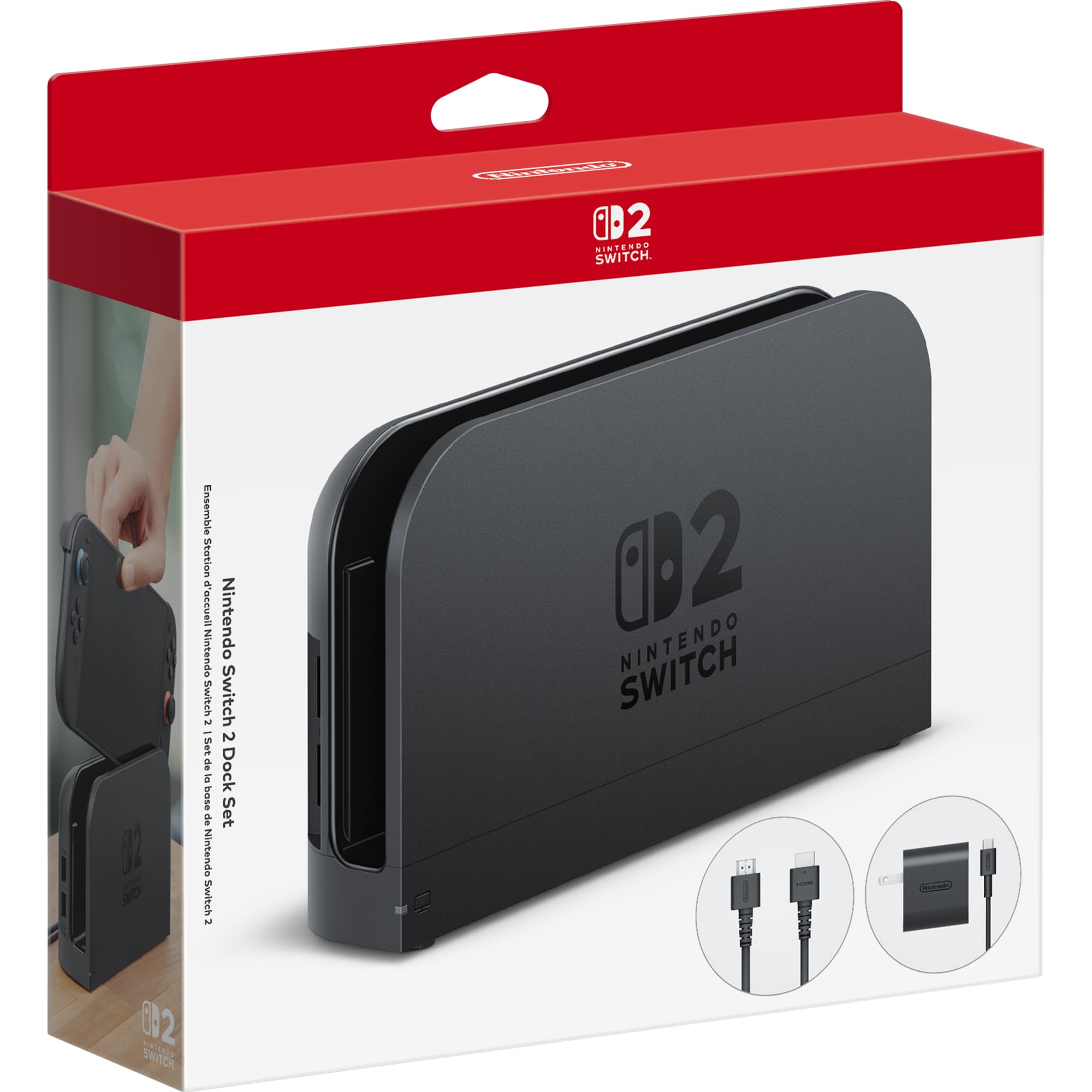
If you want a second dock that will never give you a moment of trouble, buy the official one. The $124.99 Dock Set includes the dock, the 60W AC adapter, a USB-C charging cable, and an Ultra High Speed HDMI cable — everything you need for a second TV, all first-party, all guaranteed compatible through every future firmware update. That last point matters more than it sounds: third-party docks occasionally break when Nintendo updates the console's video stack, and the official dock never does. The downside is pure economics — it's the most expensive way to get a second dock, and it still lacks Ethernet.
Best third-party dock: JSAUX 6-in-1 Gaming Dock
At $59.99 — less than half the official price — the JSAUX 6-in-1 attacks everything the official dock gets wrong. It folds flat for travel, collapsing to roughly the footprint of a large phone case. It outputs 4K/60Hz over HDMI, matching the Switch 2's maximum TV mode, and adds RJ45 Gigabit Ethernet, which the official dock conspicuously lacks — a genuine win for ranked multiplayer and massive downloads. The 100W USB-C PD input keeps the console and a Pro Controller charged simultaneously during long sessions, and it doubles as a charging stand in tabletop mode. FinalBoss scored it 8/10, praising it as "the portable, do-everything alternative to Nintendo's official dock."
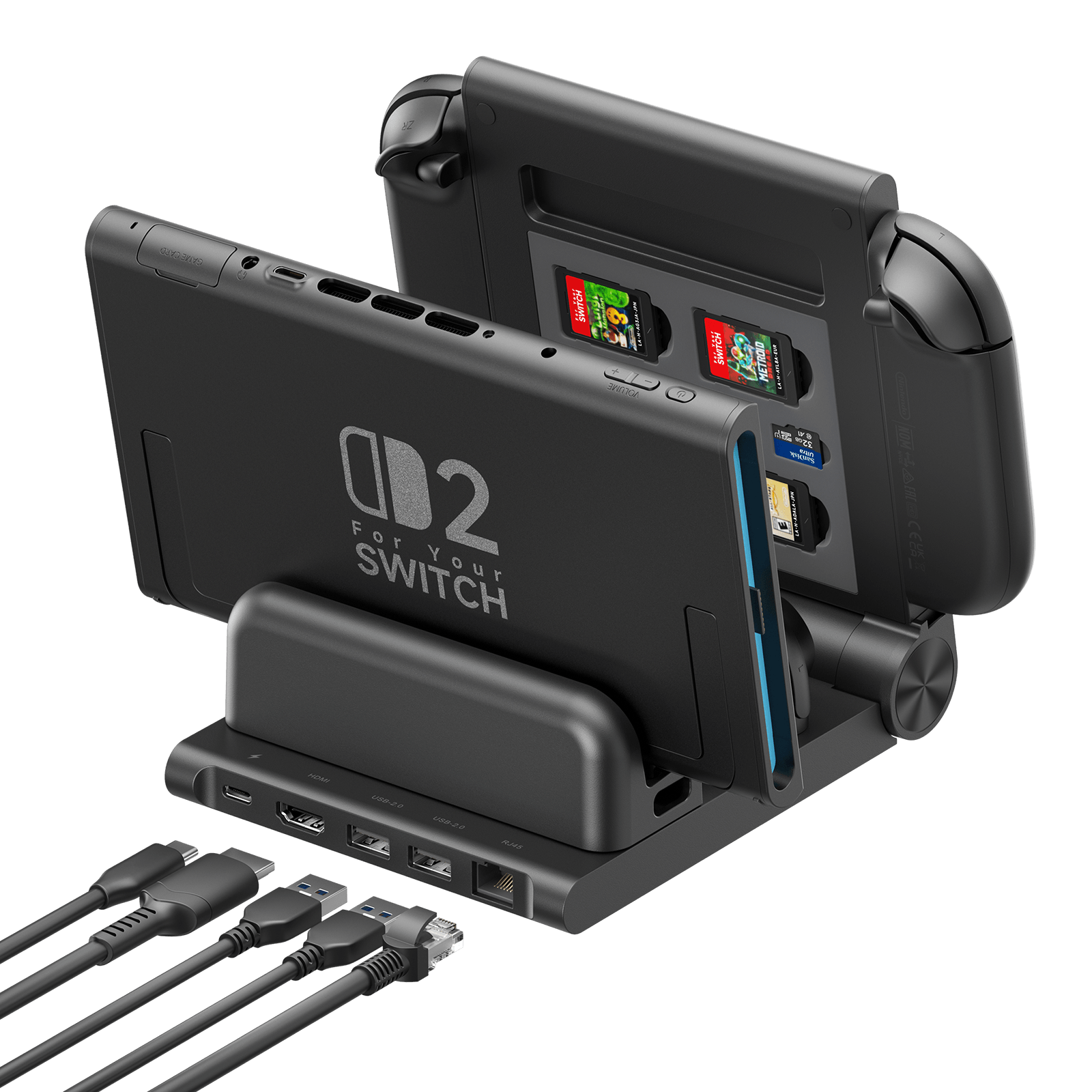
The fine print matters with this one. It needs a quality HDMI 2.0-or-better cable to hold stable 4K — an old High-Speed cable will handshake at 4K then flicker or drop to 30Hz when the console pushes its GPU. It needs a robust 100W PD brick (not included) — a recycled 30W phone charger will cause resets and low-power warnings. And community reports note the card slot may not reach SD Express speeds, so don't plan around it for storage. Buy it with a good cable and a real power brick and it's the best dock value on the market.
JSAUX also sells a 7-in-1 variant at 4K/120Hz with HDMI 2.1 if your TV supports 120Hz and you want maximum future-proofing, but the 6-in-1's 4K/60 matches what the Switch 2 actually renders in TV mode, so the extra cost buys little in practice.
Chargers: Power for Handheld and Docked Play
The Switch 2's 5,220 mAh battery delivers roughly 2-6.5 hours depending on the game, which means charging infrastructure is not optional. The good news: the console uses standard USB-C Power Delivery, so any quality 45W+ PD charger works.
The official basics: AC Adapter and Joy-Con 2 Charging Grip
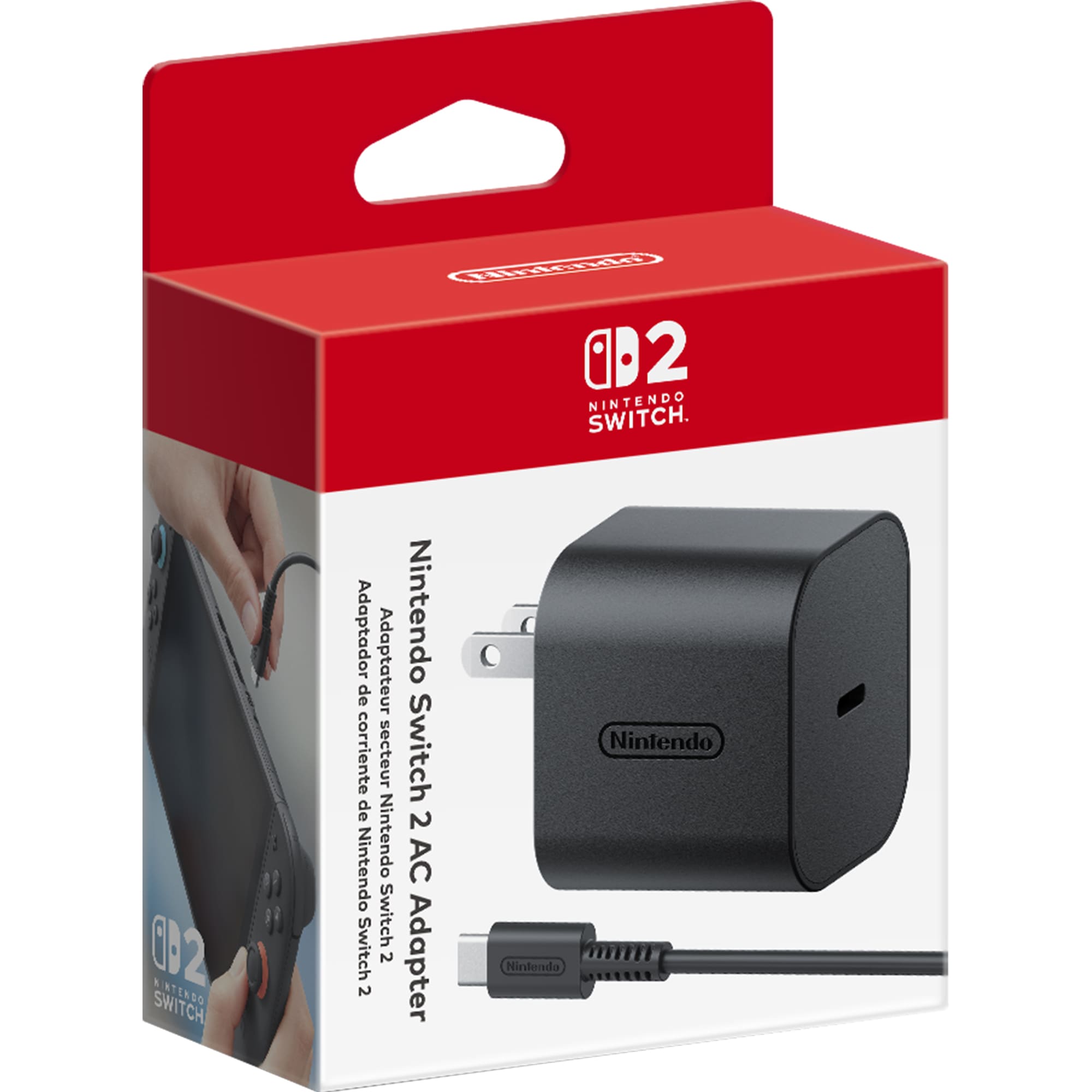
Nintendo's $34.99 AC Adapter is a 60W USB-C PD brick — the same supply class the dock uses, which means it fast-charges handheld mode and can run the console while playing. It's more expensive than equivalent third-party 60W bricks, but it's first-party, it's rated for the console, and you never have to wonder whether it's safe. If you're replacing a lost adapter or want a second one for the bedroom, it's the boring, correct choice.
The Joy-Con 2 Charging Grip ($39.99) solves a different problem: Joy-Con 2 batteries drain during handheld play, and this grip charges both controllers while you hold them. It's also simply more comfortable than bare Joy-Con 2 for longer sessions, and it adds GL/GR buttons that remap per game through the system menu. It's a modest accessory that does exactly what it promises — owner feedback is overwhelmingly positive with few complaints beyond the price.
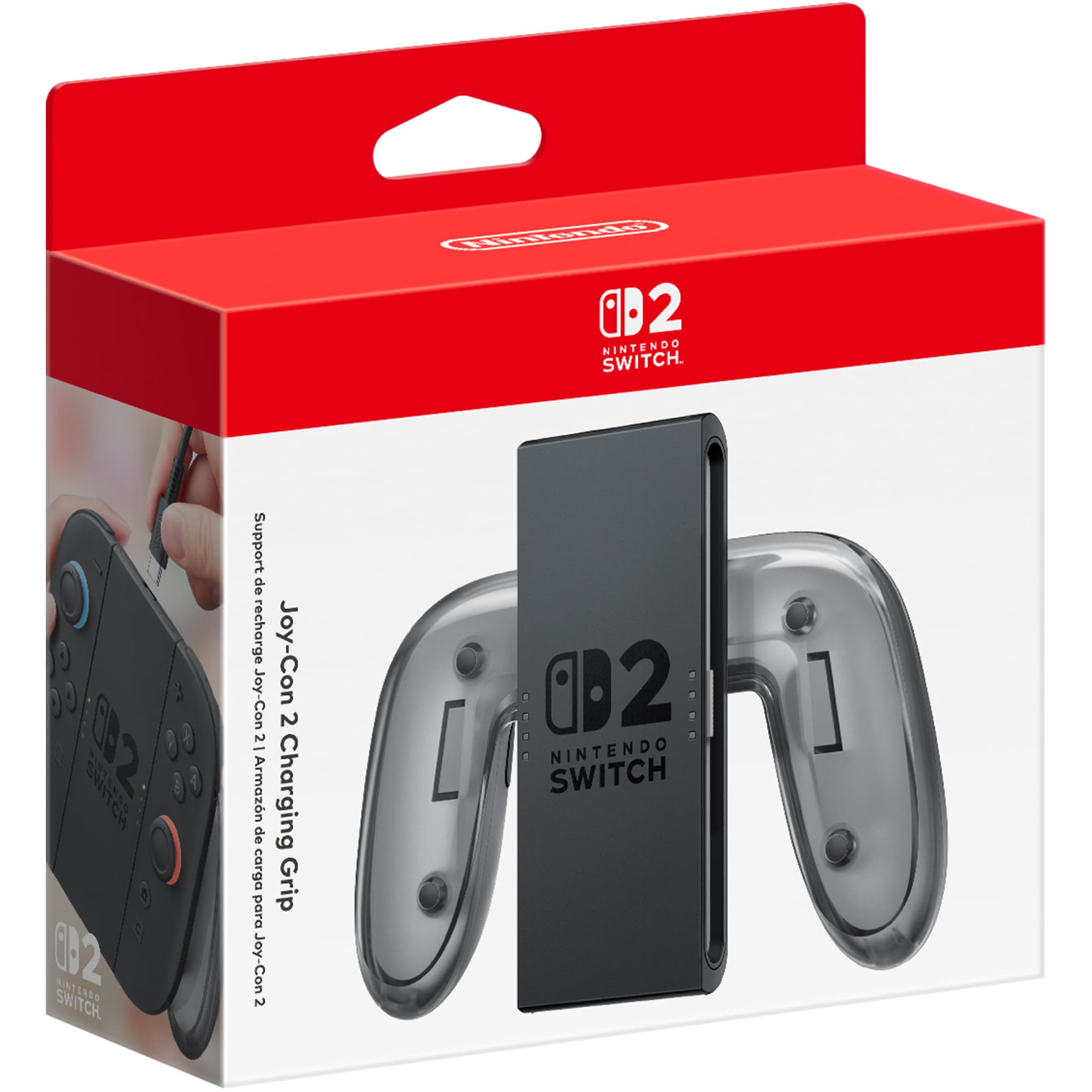
The power-bank question
The Switch 2 community is full of good power bank recommendations, and the short version is: buy any reputable 45W+ USB-C PD bank and it will charge the console at full speed. The Switch 2 only draws the power it needs, so a 100W bank is safe and future-proof for laptops too. IGN's portable-charger pick is the Anker 20K 87W Power Bank, which doubles as a laptop charger; Nintendo Life forum regulars commonly run 65W Anker bricks with zero issues. Just avoid cheap no-name banks — the community consensus is that wattage rating honesty is the real differentiator.
Belkin's Charging Grip (not to be confused with the Charging Case Pro above) takes the power-bank idea further with a $99.99 kit that includes a 10,000 mAh bank with a built-in USB-C cable, a charge display, and 30W output — enough to charge a phone or tablet too. BGR's review praises it as fixing two of the Switch 2's biggest problems at once (comfort and battery), with the caveat that the console-plus-bank combo gets heavy; the grip alone runs $39.99 if you already own a bank.
Storage: microSD Express Is Non-Negotiable
This is the accessory trap that catches the most new Switch 2 owners. The console's storage slot accepts microSD Express cards only — the faster, pricier standard that launched alongside the console. The regular microSD card from your Switch 1 is paperweight material here, and even standard microSDXC cards bought new won't work. IGN's testing is blunt: "your old SD cards from the Switch 1 will not work here. You need to get a MicroSD Express card."
Pick: Samsung microSD Express 256GB (official Nintendo version)
Samsung's officially licensed 256GB microSD Express card is the safe default: it's sold through Nintendo itself at $59.99, it's guaranteed compatible, and 256GB is the capacity that balances price against modern game sizes (AAA Switch 2 titles regularly clear 20-30GB). IGN's review of Samsung's microSD Express line found it the best value of the launch cards. WIRED's pick, the SanDisk microSD Express 256GB, offers equivalent performance at a similar price (~$59 on sale, ~$74 list) if Samsung is out of stock — community reports treat the two as interchangeable.
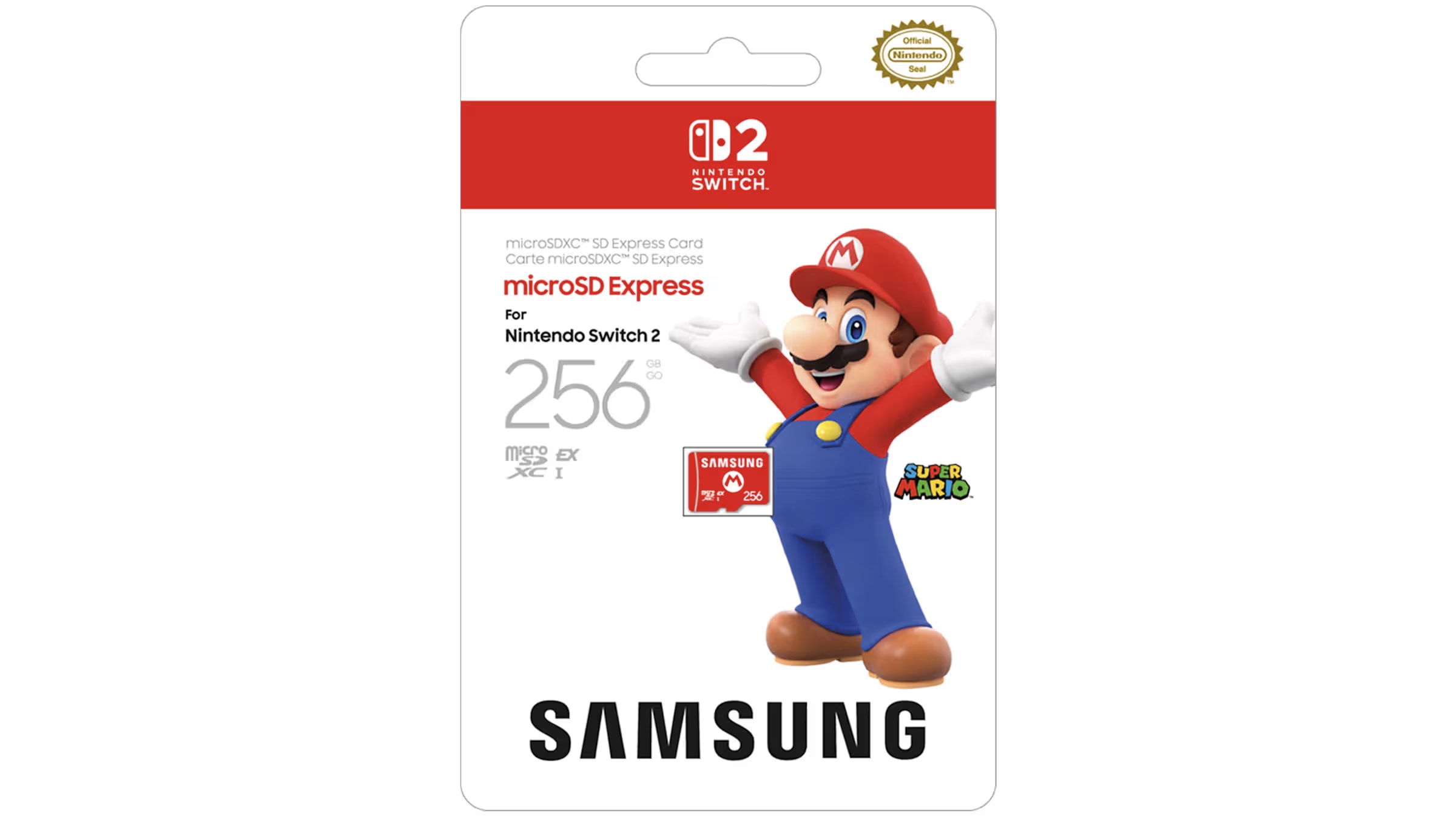
For bigger libraries, the 512GB and 1TB tiers exist but the price per gigabyte climbs steeply — at 2026 pricing, most owners are better off with a 256GB card plus regular library management than a 1TB card that costs as much as a game console. And if you only play a handful of games, the Switch 2's internal storage (256GB) may be enough to delay this purchase entirely.
Comparison Table
| Accessory | Price | Type | Best For |
|---|---|---|---|
| amFilm Auto-Alignment OneTouch (3-pack) | $9.99 | Screen protector | Best value protection, foolproof install |
| dbrand Prism 2.0 (2-pack) | $34.99 | Screen protector | Premium install experience (IGN top pick) |
| tomtoc FancyCase-G05 | $36.99 | Slim carrying case | Travel, backpack carry (IGN 9/10) |
| dbrand Killswitch 2 | $59.95+ | Grip case | Handheld-first players (Verge 8/10) |
| Belkin Charging Case Pro | $100 | Travel case + power | Frequent flyers, all-in-one carry |
| Nintendo Switch 2 Dock Set | $124.99 | Dock | Second TV, zero-risk compatibility |
| JSAUX 6-in-1 Gaming Dock | $59.99 | Dock | Portable dock + Ethernet (FinalBoss 8/10) |
| Nintendo Switch 2 AC Adapter | $34.99 | Charger | Official 60W fast charging |
| Joy-Con 2 Charging Grip | $39.99 | Charger/grip | Handheld play + Joy-Con charging |
| Samsung microSD Express 256GB | $59.99 | Storage | Expanding the library (required standard) |
FAQ
Do I need a screen protector if the Switch 2 already has a film on the screen? Yes. The factory layer is an anti-scattering film, not a scratch protector — it stays on, and a tempered glass protector goes over it. Every major outlet that tested Switch 2 screen protectors recommends one.
Will my old Switch 1 accessories work? Mostly no. Cases and grips don't fit the larger chassis. Standard microSD cards don't work at all — the Switch 2 requires microSD Express. Some original Switch controllers work over Bluetooth with limitations (no C button, no console wake), which our Switch 2 controllers guide covers in detail.
Can I use any USB-C charger? Any quality USB-C PD charger at 45W or higher will charge the Switch 2 at full speed. The dock specifically wants a 60W supply. Avoid no-name chargers; the community consensus is that cheap bricks are the most common cause of charging and dock issues.
Do grip cases fit in the dock? Most don't. The dbrand Killswitch 2 includes a dock adapter that lets the cased console dock anyway; the JSAUX Split case is thin enough to dock without an adapter. Check dock compatibility before buying any grip case.
Is the $124.99 official dock worth it? If you need a second dock and value zero compatibility risk, yes. If you want Ethernet, portability, or a lower price, the JSAUX 6-in-1 at $59.99 delivers more for less — just pair it with a quality HDMI 2.0+ cable and a 100W PD brick.
Verdict
The Switch 2 accessory market in 2026 has a clear hierarchy, and it hasn't changed much since launch: screen protector first, case second, storage third, dock and chargers as needed. The consensus picks are unusually stable across every major outlet — amFilm for budget screen protection, dbrand Prism 2.0 for the premium install, tomtoc for the travel case, dbrand Killswitch 2 for grip, JSAUX for the dock, and Samsung or SanDisk microSD Express for storage.
The one must-buy: a screen protector. At $10-35 it protects the console's best feature, and the auto-alignment kits have eliminated the traditional installation pain.
The best value: the amFilm 3-pack at $9.99 — or the JSAUX 6-in-1 dock at $59.99 if you need a second TV setup, which delivers more than the official dock for half the price.
The biggest luxury: the Belkin Charging Case Pro at $100 — a carrying case and a full extra charge in one package, for travelers who want to carry exactly one thing.
A complete starter stack — amFilm protector, tomtoc case, and a 256GB microSD Express card — runs about $105 and covers the three purchases that genuinely matter. Add a dock only if you have a second TV. Skip everything else until you've owned the console for a month and know what annoys you. That's the whole guide: protect the screen, carry it safely, expand the storage, and don't let the compatibility traps catch you.
Related Guides
Buying Guide
Best PC Gaming Handhelds 2026: The Definitive Buyer's Guide
The 2026 handheld PC market explained tier by tier: Steam Deck OLED, ROG Xbox Ally X, Legion Go S, ROG Ally X, Legion Go, and MSI Claw 8 AI+ — with the new Z2 Extreme flagship, SteamOS off-Valve for the first time, and who each device is for.
Buying Guide
Best Steam Deck Accessories 2026: Docks, Cases, Storage & More
From docks that rival the official Valve station at a fraction of the price to microSD cards that double your library overnight — the Steam Deck accessories that actually matter in 2026.
Buying Guide
Retroid Pocket 6 vs Retroid Pocket 5: Upgrade or Keep the Legend?
The Retroid Pocket 6 swaps the Pocket 5's Snapdragon 865 for an 8 Gen 2 — an ~80% emulation uplift that makes Wii and a real slice of Switch practical — while keeping the same 5.5-inch 1080p AMOLED and adding 120Hz, a 6,000mAh battery and an audible fan. Both scored 8.8/10 in our reviews; this guide settles which one fits your library, and whether RP5 owners should upgrade at all.