Best MMO Gaming Mice 2026: The Button-Heavy Buyer's Guide
MMO mice are a stubborn niche - and August 2026 just delivered its biggest shake-up in years with the Razer Naga V3 Pro. Here are the seven MMO mice actually worth your money, from the $180 flagship to the $39 budget king.
By GamepadSquire — August 12, 2026Verified
Why MMO mice still matter in 2026
An MMO mouse is the only gaming peripheral that exists to give you more buttons rather than fewer. Where esports mice shed weight and inputs to chase frame-perfect flicks, the MMO mouse adds a 12-button thumb grid so your left hand never has to leave WASD — bind your entire hotbar, your cooldowns, your mount, your potions, and still have room for a macro that types "brb, cat on keyboard" in raid chat. For anyone who plays World of Warcraft, Final Fantasy XIV, Guild Wars 2, Lost Ark, or any of the genre's long-tail survivors, it's not a luxury; it's the difference between playing the game and playing your keybinds.
Here's the thing about the category in 2026: it has been quietly dying for years. RTINGS — which has tested more than 400 mice — notes that the MMO mouse market has slowed dramatically, with few new releases and most strong options coming from older, well-established lineups. The classics kept getting recommended: the Razer Naga V2 Pro, the Corsair Scimitar family, the SteelSeries Aerox 9. And the legendary Logitech G600, discontinued and now selling for scalper prices north of $200, still tops Reddit's sentiment charts because nothing truly replaced it at its price.
Then, on August 11, 2026, Razer shipped the Naga V3 Pro — the first genuinely new flagship MMO mouse in years, and the biggest shake-up the category has seen since the Naga V2 Pro landed back in 2022. It landed to a 4/5 Editor's Choice from Tom's Hardware and an 8/10 from WIRED, and it immediately reset what "the best MMO mouse" means. That's the moment this guide exists for: the category finally has a new king, and the old guard is discounting to make room.
How to choose an MMO mouse
Before the picks, the criteria that actually separate a great MMO mouse from a frustrating one — drawn from a few thousand Reddit and owner discussions, not marketing pages:
- Button layout and reach. A 12-button grid is only useful if your thumb can hit every key without hunting. Tactile differentiation (textured columns, angled keys, raised rows) matters more than raw button count — the entire point is muscle memory. If you have a long thumb reach, an adjustable grid like the Corsair Key Slider is a genuine advantage; if not, a fixed grid saves money.
- Shape and grip. MMO mice are palm-grip tools by design. They're wide, right-handed, and built for eight-hour raid sessions. A mouse that's "comfortable for most grips" is a red flag here — you want the one that fits your hand. Small hands should steer toward the slimmer options below.
- Switch durability. You will click these buttons thousands of times per session. Optical switches (no debounce, no double-click failure mode) are the modern gold standard; 60M-100M click ratings are table stakes.
- Software. Every serious MMO mouse needs macro support, per-game profiles, and ideally onboard memory so your binds survive a PC swap. Synapse and iCUE are powerful but heavy; community sentiment on both is mixed, so factor in whether you can tolerate their quirks.
- Wireless vs wired. Wireless has won — modern 2.4GHz links are indistinguishable from wired, and battery life in this category is measured in days, not hours. Wired still makes sense as a budget move: it's cheaper, zero-latency-by-default, and never needs charging.
- What doesn't matter: raw DPI, 8K polling, and ultra-light weight. The community consensus is blunt about this — sensor specs stopped being a differentiator years ago, and no MMO player is missing kills because their mouse is 40g heavier. Spend your budget on buttons, shape, and software.
The quick picks
| Pick | Mouse | Price | Why |
|---|---|---|---|
| Best overall | Razer Naga V3 Pro | $179.99 | 23 inputs, 50K sensor, new flagship (Aug 2026) |
| Best adjustable grid | Corsair Scimitar Elite Wireless SE | $122.27 | Slide-to-fit 12-button Key Slider, 150h battery |
| Best value flagship | Razer Naga V2 Pro | $144.99 | Still the RTINGS #1, now discounted for the V3 Pro |
| Best lightweight | SteelSeries Aerox 9 Wireless | $149.99 | 89g with an 18-button layout |
| Best budget wireless | Razer Naga V2 HyperSpeed | $64.99 | True 12-button grid, 400h battery, under $70 |
| Best wired value | Corsair Scimitar RGB Elite | ~$60 | Adjustable grid, 17 buttons, wired and cheap |
| Best ultra-budget | Redragon M913 Impact Elite | $38.99 | 20 buttons, wireless, 7,000+ ratings |
Razer Naga V3 Pro — Best overall

The Naga V3 Pro is what happens when Razer finally refreshes its most stubborn icon. It keeps the exact shape that made the Naga a legend — 119.5 x 75.5 x 43.5mm of right-handed palm-grip real estate with a supportive pinky rest — and swaps out nearly everything underneath. The 12/6/2-button magnetic side plates return, now with double-shot molded keycaps that won't wear their legends off, and two new edge buttons plus a lockable ring-finger button push the total to 23 programmable inputs. That is more physical buttons than most gaming keyboards.
The internals are where the V3 Pro separates itself from the V2 Pro. The Focus Pro 50K Gen-3 sensor (50,000 DPI, 930 IPS, 90G) is the newest and fastest Razer has shipped, the Gen-4 optical switches are rated for 100 million clicks with a crisper, more deliberate feel, and the new HyperScroll Tilt Wheel Gen-2 finally makes the wheel a feature instead of a liability — tactile, free-spin, and precision modes plus tilt for horizontal scrolling. WIRED called the shape "ideal for long-term use" and noted the weight (112g bare, ~132g with the 12-button plate) is so well distributed it feels like less. Tom's Hardware awarded it Editor's Choice, concluding that for anyone who wants a mouse with a ton of buttons, "the Naga V3 Pro is now your best bet."
The complaints are real but narrow. Both WIRED and Tom's Hardware flag that 8K polling requires the separately-sold HyperPolling dongle or Mouse Dock Pro — $179.99 buys you 1000Hz out of the box. Tom's found the new edge buttons mushy and awkwardly placed, and the free-spin wheel mode over-sensitive. It's heavy next to any FPS mouse, it only comes in black, and $179.99 is a flagship price. But measured against what it claims to be — the most complete MMO mouse ever shipped — it delivers. This is the new default answer to "which MMO mouse should I buy," and we're not aware of a serious argument for a different flagship right now.
Corsair Scimitar Elite Wireless SE — Best adjustable grid

PCMag's pick for best MMO mouse overall (4.5/5, "Outstanding") is the Scimitar Elite Wireless SE, and the reason is the one feature no rival offers: the Key Slider. The entire 12-button thumb panel slides forward and backward across ~10mm of travel, so the grid sits exactly where your thumb rests — not where the average thumb rests. For players with long thumbs or unusual grip styles, that single feature is worth the price of admission. Our full review scored it 8.0/10 and called it "the best MMO mouse on the market" for palm-grip hands.
The rest of the package is flagship-grade: a Marksman S 33K sensor, third-gen optical switches rated for 90-100M clicks, up to 150 hours over 2.4GHz (500 hours on Bluetooth), onboard profiles that work without iCUE, and Elgato Stream Deck integration that turns the mouse into a productivity/streaming tool when you're not raiding. It's 114g — lighter than the Naga V2 Pro — and the matte shell, rubberized thumb rest, and PTFE feet make it a comfortable long-session companion.
Where it loses points: iCUE remains the most complained-about software in the category, with slow updates and a firmware failure documented in Tom's Hardware's testing of the family. The 12-button grid has a steep learning curve — expect misclicks for the first week. And the shape is wide and flat, ruling out claw and fingertip grips and small hands. At $122 (down from $139.99 list), it's also the value pick of the flagship tier — notably cheaper than either Naga Pro model while matching their feature sets.
Razer Naga V2 Pro — Best value flagship

The V2 Pro has been the default answer to "best MMO mouse" since 2022, and it's still the mouse RTINGS ranks #1 in the category as of its June 2026 update — RTINGS simply hasn't retested the category since the V3 Pro landed. It earned that spot honestly: three swappable side plates (12/6/2-button), the Focus Pro 30K sensor with glass tracking, Gen-3 optical switches with zero double-click failure mode, a customizable HyperScroll Pro wheel, and up to 150 hours on 2.4GHz or 300 on Bluetooth. PCMag rates it 4/5 and calls it ideal for players who dabble across multiple genres, thanks to the modular plates.
The V3 Pro's launch has done two things to the V2 Pro: made it look slightly older, and made it significantly cheaper. The street price has fallen from the $179.99 MSRP to around $145, and that's a much more interesting number. What you give up versus the V3 Pro: the older 30K sensor (nobody will notice), Gen-3 switches instead of Gen-4, a fixed-position wheel instead of the tilt wheel, and fewer total inputs. What you keep: the same shape, the same plates, the same 134g heft, and the same two genuine annoyances — the HyperScroll Pro wheel's documented reliability complaints (random free-spin drops and double-scrolls across owner reports) and Razer Synapse's bloat.
Our verdict stands at 8.0/10: still the most versatile MMO mouse money can buy, and now the value pick of the Naga family. If the V3 Pro's extra inputs and wheel improvements aren't worth $35 to you, this is the smarter buy. If you can find it under $130 on sale, it's a steal.
SteelSeries Aerox 9 Wireless — Best lightweight

Every other MMO mouse weighs over 100g, most north of 130g. The Aerox 9 Wireless is 89g — the lightest 18-button mouse on the market, and the pick for anyone who splits time between MMO raids and faster games where weight matters. RTINGS names it the best lightweight MMO mouse, citing impressive click latency, consistent tracking, and the water-resistant honeycomb shell. Battery life is strong too: up to 80 hours over 2.4GHz and 180 over Bluetooth.
The trade-offs are the reason it's a niche pick rather than a top recommendation. The honeycomb cutouts that save the weight also sit against your palm — RTINGS and owners both note the texture takes getting used to, and some find it outright uncomfortable. The 12-button grid sits high on the side, so smaller hands struggle to reach the top row without repositioning. And at $149.99 (list $189.99), it costs almost as much as the Naga V3 Pro while offering fewer inputs, an older 18K TrueMove Air sensor, and no swappable plates. Amazon sentiment is lukewarm (3.5 stars across 1,100+ ratings), and Tom's Hardware said it wasn't wowed. Buy it if you're an MMO player who genuinely can't stomach a heavy mouse; otherwise the Naga family or Scimitar offer more for the money.
Razer Naga V2 HyperSpeed — Best budget wireless

The Naga V2 HyperSpeed is the answer to the most common MMO mouse question on Reddit: "what's the cheapest mouse with a real 12-button grid that doesn't suck?" At $64.99 (list $99.99, and it regularly dips lower), it delivers the full 12-button Naga grid, a Focus Pro 30K sensor with glass tracking, HyperScroll free-spin/tactile modes, and battery life that borders on absurd — 250 hours over 2.4GHz, 400 hours on Bluetooth, on a single AA battery. It's Amazon's Choice in the category with 4.0 stars across 1,300+ ratings and 3,000+ bought in the past month, and for pure MMO utility it's the value standout of this entire guide.
The corners it cuts are the reasons it's not a 9: the side grid is fixed — no swappable plates, so you can't shrink it for FPS nights — the Gen-2 mechanical switches are rated for 60M clicks rather than the 90M optical units in the Pro models, and there's no internal battery, so you're buying AAs (a feature for some, a chore for others). Polling is 1000Hz, which is genuinely fine. If you want a dedicated MMO mouse and your budget stops well short of $100, this is the pick — and it beats every no-name budget grid on build quality and sensor by a wide margin.
Corsair Scimitar RGB Elite — Best wired value
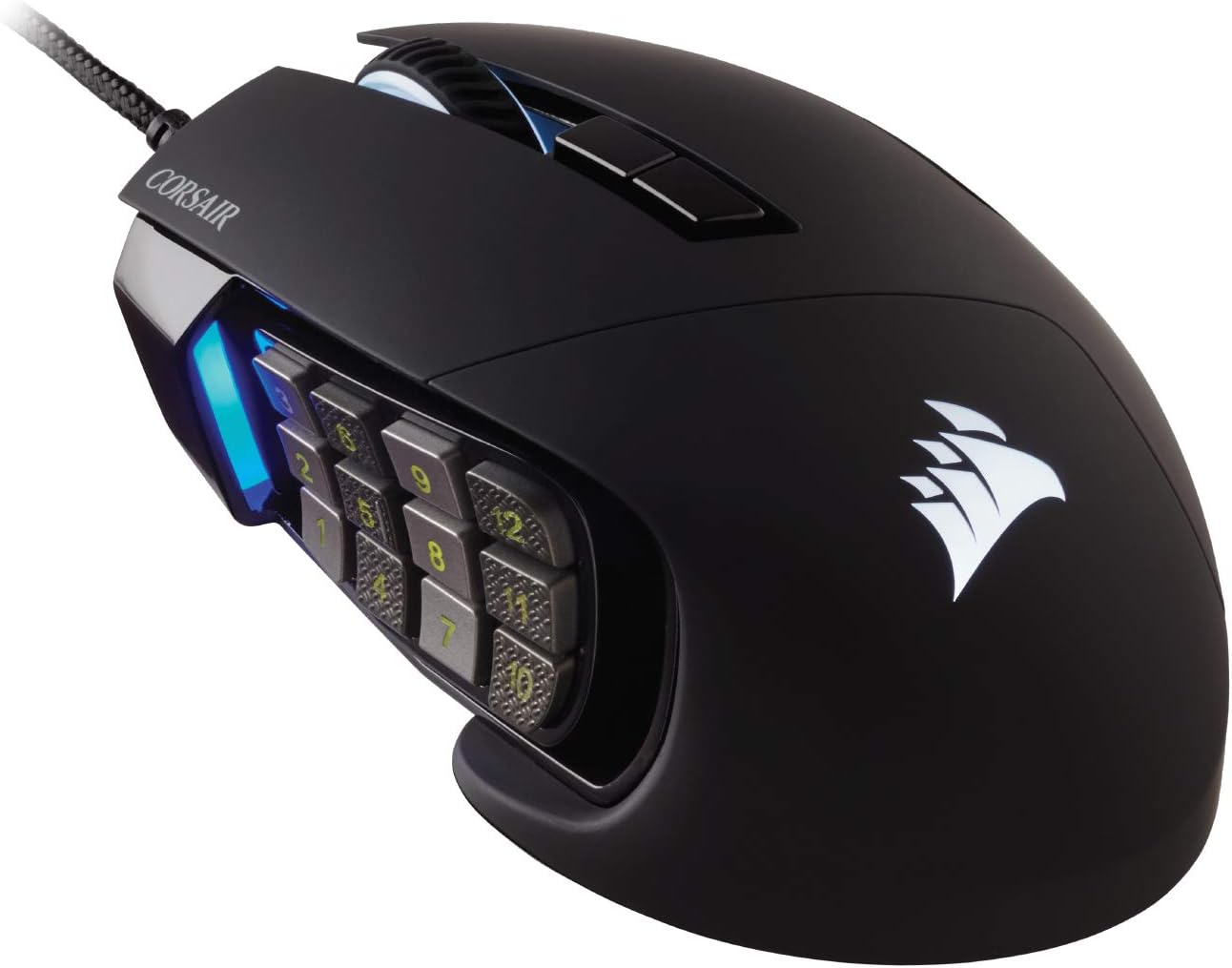
The wired Scimitar is the category's veteran value play, and RTINGS' pick for best mid-range MMO mouse — "the best value in the mid-range category, especially when its price drops to $60 or less." It brings the same Key Slider adjustability as the wireless SE — the slide-to-fit 12-button grid that makes it the right choice for long-thumb players — plus 17 programmable buttons, an 18K PixArt PMW3391 sensor, Omron switches rated for 50M clicks, and a braided cable. Current street price sits around $60, and it frequently dips below that on sales.
You're making two deals to save $60 over the wireless SE. First, it's wired — the braided cable is decent but stiff, and it's permanently tethered. Second, and more importantly, the Scimitar family's documented weak points apply: iCUE software, mushy main buttons compared to optical-switch rivals, and — the one that should make you check your return policy — a widely reported scroll-wheel failure after a few months on some units, flagged by RTINGS and echoed across owner forums. Buy from Corsair or an authorized retailer for warranty coverage. At $60 with an adjustable 12-button grid, it remains the best wired MMO mouse you can buy.
Redragon M913 Impact Elite — Best ultra-budget

If $60 is still too much, the M913 Impact Elite is the community's budget darling. For $38.99 (typical price $46.99), you get a 12-button MMO grid, 20 programmable buttons total, a PixArt 3335 sensor at 16,000 DPI, dual 2.4GHz wireless and USB-C wired modes, and 45 hours of battery with RGB on (80 in eco mode). The numbers on the box are legit — this is a real MMO mouse, not a toy — and the market agrees: 4.3 stars across 7,000+ Amazon ratings, strong 84% positive sentiment in Reddit discussions, and 1,000+ bought in the past month.
The honest caveats, from the same community: it's heavier and larger than premium options, click latency measures noticeably higher than the Razer/Corsair flagships (RTINGS data), and the software is basic — remapping works, but don't expect Synapse-grade macro tooling or cloud profiles. The plastic build is what $39 buys. For someone testing whether an MMO mouse will actually change how they play — before committing $150 to the idea — the M913 is the lowest-risk on-ramp in the category. And if you want to go even cheaper, the wired M908 variant sits around $23.
The legend you can't buy: Logitech G600
No MMO mouse guide is complete without acknowledging the elephant in the room. The Logitech G600 — the 20-button workhorse that dominated MMO peripherals for a decade — was discontinued, and its cult status has sent prices to absurd levels: it's routinely listed above $200 on Amazon, and RTINGS removed it from its recommendations back in 2024 because it was "no longer available for a reasonable price." Reddit sentiment for the G600 remains the highest of any MMO mouse (84% positive across hundreds of discussions) — owners praise the third ring-finger click, the G-Shift modifier that doubled every button, and the fact that a decade-old mouse still outlived its replacement cycle.
Do not pay $200+ for one. The community's own guidance has shifted: the Naga V2 HyperSpeed delivers a comparable 12-button grid with wireless and a modern sensor for $65, the Scimitar family offers the adjustability the G600 never had, and the Naga V3 Pro is the first mouse in years that genuinely out-specs the G600 legend. The G600's place in history is secure; its place in a 2026 shopping cart isn't.
FAQ
Do I actually need an MMO mouse? If you play MMOs, MOBAs, or any game where you regularly press 6+ keybinds mid-combat, yes — the thumb grid removes the reach from your rotation and frees your left hand for movement. If you mostly play shooters, a standard gaming mouse with 2-4 side buttons is the better tool; the weight and grid of an MMO mouse work against you in fast-paced aim games.
12 buttons or 6? Twelve-button grids are the MMO standard for a reason — full hotbar access without modifiers. But the learning curve is real, and many players never use more than six. The swappable-plate Nagas (V2 Pro, V3 Pro) are the best answer for undecided buyers: start with 12, drop to 6 or 2 when you switch games. The Scimitar's adjustable grid solves it differently by making the 12-button layout fit your thumb precisely.
Are wireless MMO mice as responsive as wired? Yes. Modern 2.4GHz links (Razer HyperSpeed, Corsair Slipstream, SteelSeries Quantum) are indistinguishable from wired in practice, and the community consensus is that raw sensor and latency specs stopped being a differentiator years ago. Battery life in this category is measured in days — 150-400 hours is typical — so wireless costs you nothing in practice.
Is the 8K polling on the Naga V3 Pro worth paying extra for? No. The V3 Pro ships at 1000Hz, which is already excellent, and the 8K upgrade requires a separately-sold dongle or dock. RTINGS and the enthusiast community are consistent that polling rate beyond 1000Hz is imperceptible for the vast majority of players — it's a spec-sheet checkbox, not a gameplay difference. Spend the money on a mousepad instead.
Verdict
The MMO mouse market spent four years coasting, and August 2026 finally changed that. The Razer Naga V3 Pro is the new flagship — 23 inputs, a 50K sensor, and a genuinely improved wheel, at a price ($179.99) that the V2 Pro used to occupy — and it's the default recommendation for anyone who takes their hotbars seriously. The Corsair Scimitar Elite Wireless SE remains the right call for palm-grip players who want the grid to fit their thumb exactly, and it's $55 cheaper. Value hunters should look at the discounted Naga V2 Pro ($145) and the wired Scimitar RGB Elite ($60), budget buyers at the Naga V2 HyperSpeed ($65), and the truly price-conscious at the Redragon M913 ($39). The only wrong answer in 2026 is paying $200 for a discontinued G600 — the category finally has worthy successors again.
Prices verified August 12, 2026 and subject to change. All products were selected based on verified specs, press testing (Tom's Hardware, WIRED, PCMag, RTINGS), and community feedback.
Related Guides
Buying Guide
Best Gaming Mice 2026: The Complete Guide for Every Budget
The 2026 gaming mouse market explained tier by tier: RTINGS-lab-verified picks from the $25 G203 to the $180 haptic Superstrike, with the Viper V4 Pro, DeathAdder V4 Pro, the $35 VXE R1 Pro budget flagship-killer, and the Chinese mid-range revolution covered in depth.
Buying Guide
Best MMO Mice Under $100 in 2026: The Budget Multi-Button Buyer's Guide
The sub-$100 MMO mouse market finally has real options: the Razer Naga V2 HyperSpeed ($65) delivers a true wireless 12-button grid, the Corsair Scimitar RGB Elite (~$60) is the wired value king with an adjustable Key Slider, and the Redragon M913 ($39) is the cheapest 12-button mouse worth buying. Lab-tested picks, honest QC caveats, and what to skip.
Buying Guide
Best Ergonomic Gaming Mice 2026: Sculpted, Vertical & Wrist-Saving Picks
Shape — not DPI — is what saves wrists. The best ergonomic gaming mice of 2026: the sculpted MX Master 3S benchmark, the 57° MX Vertical for existing wrist pain, the ergo-shaped Superlight 2 DEX for competitive play, and the Keychron M6 8K big-hand value pick, plus the vertical landscape (Pro Click V2 Vertical, Logitech Lift) explained.