Corsair
Corsair Scimitar RGB Elite Review
Good
$49.99
The wired value champion: an adjustable 12-button grid, 17 buttons, and a proven sensor for around $60. Watch for scroll-wheel QC and buy from an authorized retailer. 7.5/10 - Good.
As an Amazon Associate we earn from qualifying purchases made through links for Corsair Scimitar RGB Elite.
connectivity
Wired (braided USB-A)
sensor
PixArt PMW3391 - 18,000 DPI
switches
Omron - 50M clicks
buttons
17 programmable (adjustable 12-button Key Slider)
Pros & Cons
Pros
- Key Slider physically repositions the 12-button grid — a genuine hand-fit advantage no fixed-grid rival offers
- 17 programmable inputs with three onboard profiles and full hardware playback
- Proven PMW3391 sensor with low click latency and low lift-off distance
- Excellent build quality for the price: soft-touch shell, textured grip, 50M-click Omron switches
- 3-zone RGB including full side-grid backlighting, which the wireless competition at this price skips
- Frequently discounted well below its $79.99 launch price — often the cheapest capable 12-button mouse from a major brand
Cons
- iCUE is unintuitive and resource-heavy, and side-button behavior without it (Device Memory Mode) confuses new owners
- Key Slider can cause unresponsiveness during adjustment, a known owner-reported quirk
- Wired-only, with a fairly stiff braided cable — no wireless option at this tier
- Scroll wheel lacks left/right tilt clicks and has drawn sporadic QC complaints
- Polling-rate changes in iCUE force a full device restart
- Bulky and button-dense — explicitly poor as a general FPS mouse
Overview
The Corsair Scimitar RGB Elite is the wired workhorse of Corsair's MMO line, a mouse whose entire identity is the patented Key Slider: a 12-button thumb grid that physically slides forward and back and locks at your preferred position. Launched at $79.99 and now routinely available around $60 (and Corsair's own storefront has listed it at $39.99 on promotion), it delivers 17 programmable inputs, an upgraded PixArt PMW3391 sensor at 18,000 DPI, and Omron switches rated for 50 million clicks.
It is also, by modern standards, an old design. The Scimitar lineage dates to the mid-2010s, and the RGB Elite refresh (2020) updated the sensor and internals while keeping the same shell. That maturity cuts both ways: the shape is proven and comfortable for palm grippers, while the software experience and wired-only connection show the product's age. Tom's Guide's sister outlet Tom's Hardware scored it 3.5/5, praising the build but cautioning it "won't translate well to other genres", a fair summary of a deliberate specialist.
For MMO and MOBA players who want maximum button customization on a budget, and who don't mind a cable, the Scimitar RGB Elite remains one of the strongest value plays in the category.
Build Quality and Design
The Scimitar's shell is soft-touch plastic with a textured grip region on the right side, and it is solid: RTINGS calls it "outstanding" for MMO/MOBA use and very well-built, a verdict TechPowerUp echoes while noting a grippy coating and "above average" button quality. Measured weight is 118g per TechPowerUp (Corsair lists 122g), squarely typical for the MMO class, slightly heavier than the wireless Scimitar Elite Wireless SE (114g) and identical to Razer's Naga V2 HyperSpeed with its battery installed.
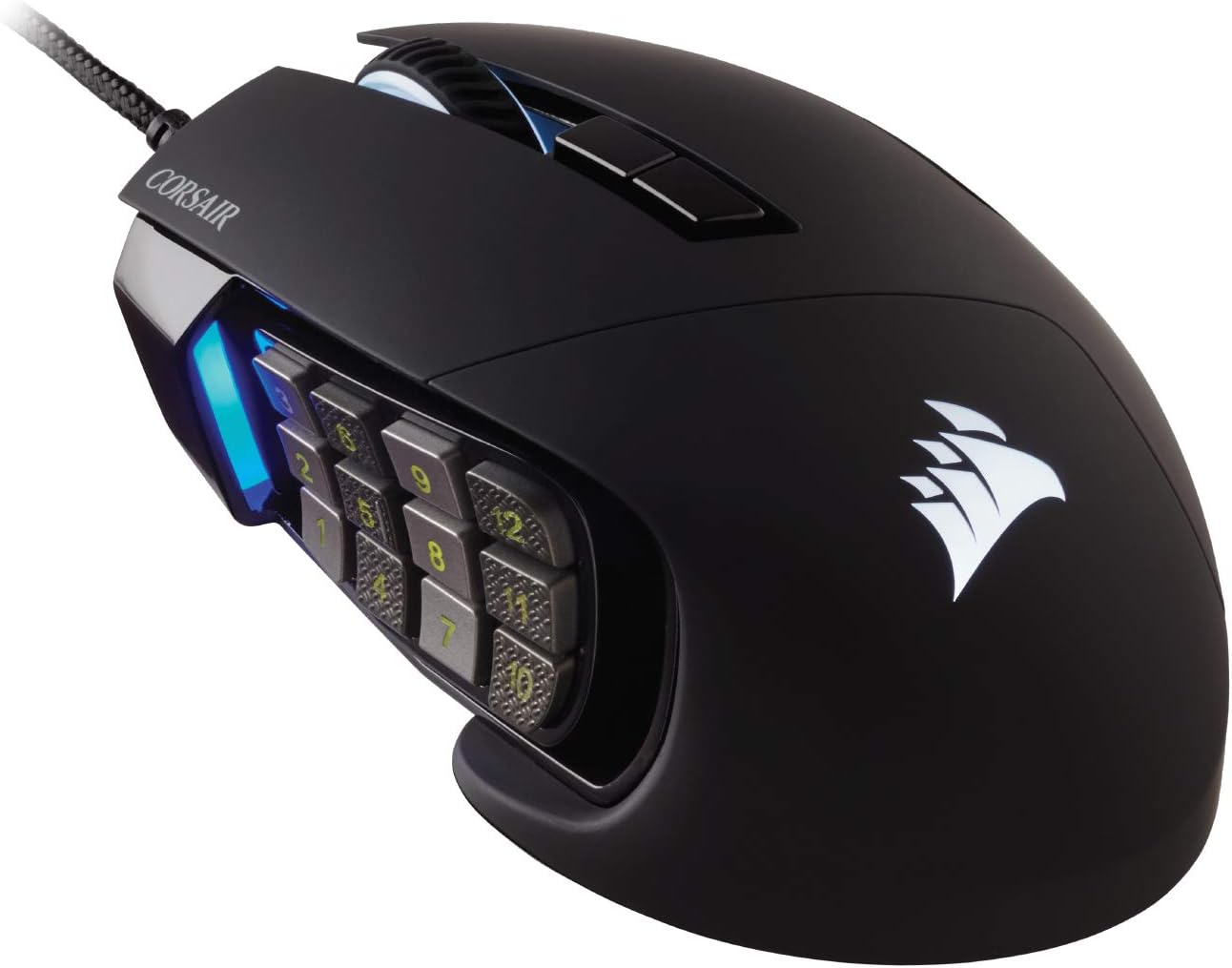
The star of the design is the Key Slider mechanism. The 12-button side grid rides on a rail and adjusts across a range of positions, then locks in place using an included hex key that stows inside the mouse's underside. This is not a gimmick, it is the feature that separates the Scimitar from every fixed-grid rival, and it directly addresses the most common complaint about 12-button mice: that the grid is always slightly too far or too near for your thumb. Hand-size fit that Razer's fixed Naga grid cannot solve, Corsair solves mechanically.
Two design realities temper the picture. First, it is wired-only: a braided USB cable, fairly stiff per RTINGS, with no wireless option at this tier. Second, the slider mechanism and iCUE software combination has produced a distinct set of recurring owner complaints, covered below, the mechanism itself is fine, but the experience of adjusting it is less polished than it should be.
Key Features
- Patented Key Slider, the 12-button side grid physically repositions and locks with an included hex key, adapting thumb reach to hand size
- 17 programmable inputs, 12 side buttons plus scroll wheel click, DPI shift, and standard clicks, all remappable in iCUE with three onboard profile slots
- PixArt PMW3391 sensor, 18,000 DPI optical sensor with 1-DPI increment adjustment and low lift-off distance
- Omron mechanical switches rated for 50 million clicks on the main buttons
- 4-zone RGB lighting, logo, scroll wheel, side grid, and front grill backlighting, all configurable in iCUE
- 8MB onboard memory, hardware playback of profiles, macros and lighting, so settings travel with the mouse
- Braided USB cable with gold-plated USB connector; 2-year warranty
Performance
Instrumented testing is positive across the board. TechPowerUp measured great sensor performance, low click latency, a good scroll wheel and nicely gliding feet; RTINGS' testing found low click latency, low lift-off distance, a wide CPI range adjustable in single-DPI steps, and glide quality suitable for fast swipes. In practice the PMW3391 is a proven, dependable sensor, not the very latest flagship, but absent any real-world weakness for MMO rotations, MOBA skill chaining or general desktop work.
The performance conversation that actually matters here is software. iCUE is powerful, per-button remapping, macros, timers, lighting scenes, DPI stages, but it is the Scimitar experience's weak point, and the community record is consistent about how. A cluster of long-running owner reports describe side buttons that only work when iCUE is running, even after programming hardware assignments; the fix most owners land on is enabling Device Memory Mode, which is buried rather than surfaced. Others describe the Key Slider causing the mouse to become unresponsive while being adjusted, forcing the pad back to its original position or replugging the mouse. RGB settings not persisting to onboard memory draws similar complaints. None of these are universal, but together they sketch a clear picture: expect an initial setup period of an hour or two of forum archaeology before everything behaves, after which the mouse is dependable.
A final manufacturing note: TechPowerUp's review sample had one side button of notably poor quality, a reminder that Corsair's side-button QC has occasional variance. Buy from a retailer with easy returns.
Pros and Cons
Pros:
- Key Slider physically repositions the 12-button grid, a genuine hand-fit advantage no fixed-grid rival offers
- 17 programmable inputs with three onboard profiles and full hardware playback
- Proven PMW3391 sensor with low click latency and low lift-off distance
- Excellent build quality for the price: soft-touch shell, textured grip, 50M-click Omron switches
- 4-zone RGB including full side-grid backlighting, which the wireless competition at this price skips
- Frequently discounted well below its $79.99 launch price, often the cheapest capable 12-button mouse from a major brand
Cons:
- iCUE is unintuitive and resource-heavy, and side-button behavior without it (Device Memory Mode) confuses new owners
- Key Slider can cause unresponsiveness during adjustment, a known owner-reported quirk
- Wired-only, with a fairly stiff braided cable, no wireless option at this tier
- Scroll wheel lacks left/right tilt clicks and has drawn sporadic QC complaints
- Polling-rate changes in iCUE force a full device restart, making experimentation tedious
- Bulky, heavy and button-dense, explicitly poor as a general FPS mouse
Who Should Buy This
MMO and MOBA players on a budget who want a 12-button grid that adapts to their hand, and who are comfortable staying wired. If you have found fixed 12-button grids slightly wrong for your thumb, too far forward, too cramped, the Key Slider alone justifies choosing this mouse, because nothing else at the price solves that problem. It also suits players who keep lighting customization: the side-grid RGB is a differentiator against battery-constrained rivals.
Skip it if wireless is a requirement (the Scimitar Elite Wireless SE exists for that, at roughly double the price), if you play shooters as a primary genre, or if you have zero patience for software fiddling during initial setup. Claw-grip players with smaller hands may also find the tall, wide shell a poor fit, Tom's Hardware specifically dinged it for claw comfort.
Alternatives to Consider
- Razer Naga V2 HyperSpeed (~$65), the direct rival: wireless, 250-hour AA battery, flagship 30K sensor, but a fixed grid and no side-grid lighting. Choose it for wireless freedom; choose the Scimitar for slider adjustability.
- Redragon M913 Impact Elite (~$39), the ultra-budget alternative with 16 buttons and solid specs. Materials and click quality sit a tier below the Corsair.
- Corsair Scimitar Elite Wireless SE (~$122), same Key Slider concept, wireless, with a newer sensor. Double the price for the liberation from the cable.
Verdict
The Scimitar RGB Elite survives as a 2026-relevant product for one reason: the Key Slider remains the only physically adjustable 12-button thumb grid on the market, and it is attached to a well-built, well-specified mouse that now costs $60 or less. The sensor is proven, the button count is generous, and the lighting is a cut above similarly priced rivals. Against it stand a stiff wired cable, dated software with real setup friction, and occasional side-button QC variance. For MMO and MOBA players who value fit above all, it is an easy recommendation at this price, TechGearLab still names it their Best MMO Mouse pick. 7.5/10, Good, with the caveat that its score depends on your tolerance for iCUE and a cable.
What the Experts Say
Professional review consensus for this product
Full Specifications
| connectivity | Wired (braided USB-A) |
|---|---|
| sensor | PixArt PMW3391 - 18,000 DPI |
| switches | Omron - 50M clicks |
| buttons | 17 programmable (adjustable 12-button Key Slider) |
| weight | 118g (measured, TechPowerUp) |
| polling_rate | 1000Hz |
| rgb | 4 zones |
| warranty | 2 years |
The Verdict: Good
The wired value champion: an adjustable 12-button grid, 17 buttons, and a proven sensor for around $60. Watch for scroll-wheel QC and buy from an authorized retailer. 7.5/10 - Good.
— GamepadSquire, September 2026
As an Amazon Associate we earn from qualifying purchases made through links for Corsair Scimitar RGB Elite.
Related Buying Guide
Buying Guide
Best Gaming Mice 2026: The Complete Guide for Every Budget
The 2026 gaming mouse market explained tier by tier: RTINGS-lab-verified picks from the $25 G203 to the $180 haptic Superstrike, with the Viper V4 Pro, DeathAdder V4 Pro, the $35 VXE R1 Pro budget flagship-killer, and the Chinese mid-range revolution covered in depth.
Buying Guide
Best Ergonomic Gaming Mice 2026: Sculpted, Vertical & Wrist-Saving Picks
Shape — not DPI — is what saves wrists. The best ergonomic gaming mice of 2026: the sculpted MX Master 3S benchmark, the 57° MX Vertical for existing wrist pain, the ergo-shaped Superlight 2 DEX for competitive play, and the Keychron M6 8K big-hand value pick, plus the vertical landscape (Pro Click V2 Vertical, Logitech Lift) explained.