Best Controllers for Steam Deck 2026: The Definitive Buyer's Guide
The Steam Deck is the most controller-friendly handheld ever made — but the right pad depends on how Bluetooth, 2.4GHz dongles, gyro, and Steam Input actually behave on SteamOS. From the $29.99 8BitDo Ultimate 2C to Valve's own Steam Controller revival, every controller worth pairing with a Deck in 2026, ranked and explained.
By GamepadSquire — August 6, 2026Verified
Best Controllers for Steam Deck 2026: The Definitive Buyer's Guide
The Steam Deck's built-in controls are the most flexible gamepad ever shipped — symmetrical sticks, four back buttons, two trackpads, and a gyro that turns any shooter into a motion-aiming machine. But they are welded to a 640-gram slab, and the moment the Deck goes into a dock and onto a TV, or the moment a three-hour session starts to fatigue your wrists, an external controller stops being an accessory and starts being the point. Docked play is where the Deck shines brightest, and the pad you pair with it decides how much of that potential you actually get.
2026 is a genuinely good year to shop this category. The anti-drift sensor revolution that started with Hall effect sticks has become table stakes: controllers under $30 now ship with drift-immune sticks that would have been a $150 premium feature three years ago. Valve revived its Steam Controller with a completely redesigned follow-up. And SteamOS has matured into the most controller-friendly operating system on earth — it treats virtually every Bluetooth and USB-C pad as a first-class citizen, with per-game remapping, gyro calibration, and community configs built in. The problem is no longer compatibility. It is choosing well.
This guide answers one question: which controller should you pair with a Steam Deck in 2026? It is built from three sources — the consensus of the r/SteamDeck community, whose "best controller" threads are the most honest durability and compatibility reporting in the industry; press roundups like IGN's 2026 Steam Deck controller guide; and this site's own in-depth reviews of every pad below. Every pick includes a

link where we've reviewed the hardware in full. The question we tried to answer for every candidate: what will annoy you about this controller six months after you buy it, specifically when it's paired with a Deck?
Quick Picks
| Tier | Controller | Price | Connection | Best For |
|---|---|---|---|---|
| Best overall | 8BitDo Ultimate 2 Wireless | $59.99 | 2.4G (1000Hz) + BT + USB-C, dock | The complete docked package |
| Best premium | Steam Controller (2026) | $99.99 | Puck 2.4G + BT + USB-C | Trackpad/gyro power users, Steam-first libraries |
| Best for PS5 owners | Sony DualSense | $74.99 | BT + USB-C | Haptics, touchpad-as-mouse, gyro |
| Best wired | GameSir G7 Pro | $79.99 | USB-C wired | Zero-latency docked play, competitive games |
| Best budget | 8BitDo Ultimate 2C Wireless | $29.99 | 2.4G (1000Hz) + BT (Android only) | Hall-effect value, travel |
| Best value wireless | GameSir Cyclone 2 | $55.99 | 2.4G + BT + USB-C | Three-mode flexibility |
How We Picked
Every recommendation in this guide is triangulated from three independent sources. Community feedback: r/SteamDeck is the earliest warning system for controller compatibility quirks on SteamOS — pairing issues, dead features over specific connection modes, wake-from-sleep behavior — and its "best controller" threads are among the most-voted discussions in the subreddit. Press consensus: IGN's 2026 roundup anchors the mainstream view, and specialist coverage like SteamDeckHQ's hands-on reviews captures the Deck-specific details generalist outlets miss. This site's reviews: every pad below has been reviewed in depth on GamepadSquire, including verified latency data, spec analysis, and owner-sentiment synthesis from thousands of Amazon and community reviews.
The hard part of this category is that a controller's behavior on a Deck is not the same as its behavior on a PC. SteamOS has opinions about connection modes, button mapping, and gyro that vary pad by pad. So every pick below comes with a Deck-specific verdict, not just a general one.
What Actually Matters on a Steam Deck (and What Doesn't)
Connection method is the #1 decision. The Deck accepts Bluetooth, wired USB-C, and 2.4GHz dongles (via a dock's USB-A ports or a USB-C OTG adapter). They are not interchangeable in practice. Bluetooth is the most convenient — no dongle, works with every pad — but community reports across r/SteamDeck note that pairing can occasionally need a retry, and Bluetooth adds latency and battery drain. A 2.4GHz dongle is the low-latency, rock-solid choice for docked play, which is why the best Deck pads include one in the box. Wired USB-C is the simplest of all: zero latency, zero pairing, zero battery anxiety, and the Deck's single USB-C port makes it trivially easy.
Gyro is the Deck's superpower — get a pad that has it. SteamOS's gyro-to-aim implementation is the best in the business, and the Deck community is heavily invested in motion aiming. If you play shooters docked, a pad without a 6-axis gyro is leaving your best aim technique on the table. This is the single biggest reason the Xbox Wireless Controller is no longer the default recommendation for Deck owners.
Anti-drift sticks are now a $30 feature. Hall effect and TMR sticks are effectively immune to the drift that kills potentiometer pads, and in 2026 they appear from $29.99 up. Buying a potentiometer pad in 2026 to use with a handheld you plan to keep for years is buying a known failure point.
Back buttons matter more docked than handheld. The Deck's built-in rear buttons spoil you; on a TV pad, back buttons (or at least extra bumpers) are what let you keep thumbs on sticks. Pads with two rear buttons are common at $30-60; four is the pro-tier feature.
Layout is a preference, not a spec. Xbox layout matches the Deck's own buttons, which makes it the zero-friction choice. PlayStation layout puts the left stick where the Deck's trackpad is — closer to the center — which some players genuinely prefer for comfort. Symmetrical Steam Deck fans will feel at home with the Steam Controller. All three work flawlessly on SteamOS.
Wake-from-sleep behavior is the hidden gotcha. Whether a pad can wake a sleeping Deck varies by controller and connection mode. Community reports consistently show Bluetooth pads waking the Deck more reliably than 2.4GHz dongles. If couch play is your primary use, this is worth more consideration than RGB.
Best Overall: 8BitDo Ultimate 2 Wireless ($59.99)
The 8BitDo Ultimate 2 is the answer r/SteamDeck keeps arriving at — it was the most-upvoted response in the subreddit's perennial "best controller to have along your deck" thread, and IGN's roundup positions the Ultimate line as the best-connectivity Steam Deck pad. This site scored it 9/10, calling it the best-value wireless controller of 2026. The consensus is unusually consistent.
What earns it: TMR sticks (the newer, more precise generation of anti-drift sensors), switchable Hall effect triggers that flip between linear travel for racing and tactile snap for shooters, genuine 1000Hz polling over its 2.4GHz dongle, a six-axis gyro, two back paddles plus extra L4/R4 bumpers, and — the part Deck owners care about most — an included charging dock that doubles as the dongle cradle. The dock makes it the tidiest living-room package in the category: the pad is always charged, the dongle is always docked, and the whole setup takes one USB-A port on your Steam Deck dock. Amazon ratings sit around 4.5 stars across roughly 4,800 reviews, an unusually large feedback base for a pad this new.
The Deck-specific caveats are real but manageable. Over the 2.4GHz dongle, SteamOS occasionally registers the Ultimate 2 as a basic D-Input pad rather than the full-featured controller — community threads on the Steam Deck bug reports forum document this, and the reliable fix is pairing over Bluetooth, which gives Steam Input full access to the back buttons and extra bumpers. Bluetooth reliability itself is the pad's most common criticism in owner feedback, so treat the 2.4G connection as the primary and BT as the feature-rich fallback. There's also no console support and no audio jack — it's a PC/Deck/Android/Apple pad, full stop. None of that matters for a Deck owner, and at $59.99 nothing else combines this feature set with this feedback base.

Best Premium: Steam Controller (2026) ($99.99)
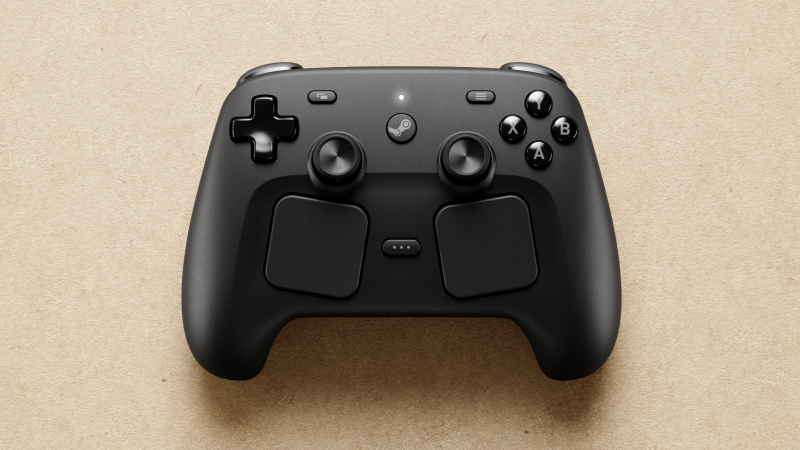
Valve's comeback controller is the Steam Deck without the screen — literally: same symmetrical layout, same dual trackpads, same four rear buttons, same Steam Input DNA. It pairs TMR sticks with two haptic trackpads, four haptic motors, capacitive grip sensors that detect how you're holding it, and a 6-axis gyro. SteamDeckHQ's hands-on review — 4.5/5 — calls it "the best controller for PC gaming, especially if you primarily use Steam," and this site's review (8/10) calls it the most capable PC controller ever shipped. For a Steam Deck owner, it is the only controller that is genuinely native to the platform: Steam Input configs are shared with the Deck, community layouts carry over, and the magnetic Puck dongle pairs up to four controllers with roughly 8ms latency while doubling as a charging station.
The trade-offs are the most polarizing in the category. First, the walled garden: there is no XInput mode, so outside Steam — Game Pass, Epic, standalone launchers — the controller simply doesn't work without workarounds. If your library is Steam-first, you'll never notice; if it isn't, this is a dealbreaker. Second, it's the heaviest pad in this guide, a consequence of the trackpads, haptics, and grip sensors packed inside. Third, Bluetooth requires a firmware update performed over USB from a PC or docked Deck before it will pair — a genuinely awkward out-of-box step that caught reviewers off guard. And fourth, the trackpads have a learning curve for players who've never used them.
Who should buy it: the Deck owner who already uses the trackpads, wants gyro-plus-trackpad aim in shooters, plays point-and-click and strategy titles docked, and lives inside Steam. Who should skip it: anyone who wants a conventional pad or plays outside Steam. The 35-hour battery and the sheer capability make $99.99 defensible — it's the only controller that does what it does — but it's a specialist tool, not a default.
Best for PS5 Owners (and Haptics): Sony DualSense ($74.99)
IGN's top pick for the Steam Deck, and the community's favorite "I already own one" answer: the DualSense is the most feature-complete pad you can pair with a Deck if you also own a PS5. Its haptic feedback and adaptive triggers work over Bluetooth in Steam games — a genuinely rare case of console-exclusive features functioning on SteamOS — and the touchpad is fully customizable through Steam Input, functioning exactly like a Deck trackpad (mouse emulation, radial menus, the works). The gyro is excellent and heavily used by the r/GyroGaming community on Deck. Pairing is plug-and-play: put it in pair mode, tap it in Settings → Bluetooth, done. The OP of the r/SteamDeck "best controller along your deck" thread made exactly this case — the touchpad finally has a purpose, and it just works.
The honest negatives: battery life is the worst in this guide at roughly 8-12 hours — IGN cites up to 8 — which means charging more often than any rival here, especially if haptics are on. The sticks are still potentiometer-based, so drift is a when-not-if concern on a pad you'll use for years. And at $74.99 it's not a value pick; you're paying for features that only fully express themselves on a PS5. But for PlayStation owners who want one pad across both machines, or for anyone who wants the best haptics and touchpad-as-mouse on a Deck, it's the pick. This site's review scores it 8/10, with the same caveats.

Best Wired: GameSir G7 Pro ($79.99)
If you play docked at a desk — or you simply never want to think about batteries, pairing, or wireless latency again — the G7 Pro is the answer, and this site's review scored it 9/10. It's wired USB-C only, which on a Deck means plugging straight into the handheld's own port or into a dock. That's the entire pitch, and it's a great one: TMR sticks, Hall effect triggers, 1000Hz polling, optical microswitch face buttons, and a charging dock in the box at $79.99 — a feature set that embarrasses pads twice the price. SteamDeckHQ's July 2026 hands-on with the newer G7 Pro 8K called the platform "the most comfortable controller I've ever used," and the ergonomics are the family's calling card: textured grips, well-damped triggers, and an Xbox-style layout that matches the Deck's button positions exactly.
What you give up: the cable, of course, which is a non-issue at a desk and a minor annoyance on a couch (long USB-C cables fix it), and the lack of a gyro — GameSir's wired line skips motion controls, so gyro-aimers should look at the wireless options above. There's no Bluetooth, no console support beyond PC/Xbox/Deck, and the software for advanced remapping lives in a Windows app. For competitive docked play — fighting games, rhythm games, anything where a dropped frame of input costs a round — wired 1000Hz is the most honest performance you can buy, and the G7 Pro delivers it at a price that makes the $180 pro pads look silly.

Best Budget: 8BitDo Ultimate 2C Wireless ($29.99)
The 2C Wireless is the best-selling PC gamepad on Amazon for a reason, and it's the default budget answer in r/SteamDeck threads: Hall effect sticks and triggers, genuine 1000Hz polling over its 2.4GHz dongle, extra L4/R4 bumpers, metal stick rings, and a 19-hour battery — for $29.99. This site's review scored it 8.8/10 and called it the budget wireless controller to beat, and the ~7,000 Amazon ratings hover around 4.5 stars. On a Deck it works exactly how you'd hope: plug the dongle into a dock (or a USB-C adapter) and it's a low-latency, drift-proof pad that costs less than a night out.
The catches are the class's usual ones. Bluetooth on the 2C is Android-only, so Deck owners are committed to the 2.4GHz dongle — fine for docked play, mildly annoying if you wanted BT for tabletop sessions, and it means the pad won't wake a sleeping Deck over Bluetooth the way some rivals do. The shape is slim and slightly small; larger hands report it cramped over long sessions. The D-pad is functional but not premium, and there's no back buttons — just the extra bumpers. None of these are real objections at $29.99. If the Ultimate 2 Wireless is the complete package, the 2C is 80% of it at half the price.

Notable Mentions Worth Knowing
- GameSir Cyclone 2 ($55.99): The best sub-$60 three-mode wireless pad — TMR sticks, 1000Hz, and a 2-in-1 trigger system that flips between analog and snap. Community feedback flags a mushy D-pad and jittery Bluetooth, so Deck owners should stick to the 2.4GHz dongle.

- Xbox Wireless Controller ($51.99): Still the zero-friction default — native SteamOS support, the layout every Deck owner already knows, roughly 30 hours of battery. But no gyro and potentiometer sticks make it the wrong 2026 buy for motion aimers and long-haul owners.

- EasySMX X05 ($29.99): The budget alternative to the 2C — Hall effect sticks and triggers, four-platform wireless, and a chunkier grip that bigger hands prefer, with a slightly rougher finish and less community feedback behind it.

- Gulikit KK3 Max ($79.99): The four-paddle, 1000Hz, Hall-effect multi-platformer — superb breadth for Switch-and-Deck owners, held back by mushy face buttons and patchy software.

How to Connect Any Controller to Your Deck
The Deck makes this easier than any device on earth, but a few specifics save real frustration:
- Bluetooth: Open Settings → Bluetooth, put the pad in pairing mode (hold the pair button until the LED flashes), tap it when it appears. If it drops or won't pair, toggle Bluetooth off and on — community reports suggest this resolves the occasional failed first pairing.
- 2.4GHz dongle: Plug the dongle into your dock's USB-A port (or a USB-C OTG adapter for tabletop play). The dongle is the low-latency option and, for most pads, the one that "just works" with Steam Input.
- Wired: USB-C straight into the Deck or dock. Zero setup, zero latency, and for pads like the G7 Pro it's the only mode — which is the point.
- Firmware first: Update the pad (and dongle) before first use. The Steam Controller 2026 won't even enter Bluetooth mode until it's updated over USB, and 8BitDo pads behave better on SteamOS after updating both dongle and controller.
- Wake behavior: Expect Bluetooth pads to wake a sleeping Deck more reliably than 2.4GHz dongles. If couch play is the primary use, factor that in.
Mistakes to Avoid in 2026
- Buying a potentiometer pad. Drift-immune Hall effect or TMR sticks cost $30 in 2026. There is no good reason to buy a known failure point for a device you'll keep for years.
- Assuming Bluetooth is the best connection. It's the most convenient, but 2.4GHz dongles are lower-latency and more stable — and some pads behave differently over BT vs dongle on SteamOS (the Ultimate 2's back buttons being the case in point).
- Buying an Xbox pad for gyro. The Xbox Wireless Controller has none. If motion aiming matters, it's DualSense, Steam Controller, or the 8BitDo/GameSir wireless lines.
- Buying the Steam Controller for a non-Steam library. No XInput means no Game Pass, no Epic, no standalone launchers. Steam-first only.
- Overspending for couch play. The Elite Series 2 paddles are notoriously flaky on SteamOS per IGN's roundup and community reports, and the $60-80 tier delivers everything a Deck owner actually needs.
- Forgetting the dock's USB budget. Your Steam Deck dock's USB-A ports are shared between the controller dongle, a keyboard dongle, and anything else — plan around it (a good dock like the JSAUX 6-in-1 has three USB-A ports; check before you buy).
Final Verdict
The 2026 Steam Deck controller market is the strongest it's ever been: anti-drift sticks at budget prices, a genuine Valve flagship, and SteamOS support so mature that compatibility is a non-issue for any pad worth buying. The real decisions are connection mode, gyro, and how much you want to spend.
Our recommendations by use case:
- Best overall (docked, wireless, most people): 8BitDo Ultimate 2 Wireless — read the review
- Best premium (trackpads, gyro, Steam-first): Steam Controller (2026) — read the review
- Best for PS5 owners / haptics: Sony DualSense — read the review
- Best wired (competitive docked play): GameSir G7 Pro — read the review
- Best budget: 8BitDo Ultimate 2C Wireless — read the review
For the wider picture, see our Best Steam Deck Accessories 2026, the Best PC Controllers 2026 roundup, the best controllers with no stick drift, and our budget controller picks under $50. If you're choosing between handhelds themselves, the Steam Deck OLED vs ROG Ally X vs Legion Go showdown is the place to start.
The rule for 2026 is simple: pick a pad with anti-drift sticks, decide whether you want gyro, and match the connection to how you actually play — dongle for the dock, Bluetooth for the couch, cable for the desk. Any pad on this list will make your Deck better. The right one will make it disappear.
Related Guides
Buying Guide
Best PC Gaming Handhelds 2026: The Definitive Buyer's Guide
The 2026 handheld PC market explained tier by tier: Steam Deck OLED, ROG Xbox Ally X, Legion Go S, ROG Ally X, Legion Go, and MSI Claw 8 AI+ — with the new Z2 Extreme flagship, SteamOS off-Valve for the first time, and who each device is for.
Buying Guide
Best Handheld Gaming Consoles 2026: Steam Deck, Switch 2, and Every Pick In Between
The head-term answer for 2026: which handheld gaming console to buy across PC handhelds, the Nintendo Switch 2, and retro emulation picks — with verified review scores and post-price-hike pricing.
Buying Guide
Steam Deck OLED vs ROG Ally X vs Legion Go: The 2026 Handheld Showdown
Four handhelds, four philosophies — console-like SteamOS, raw Windows power, a big-screen detachable hybrid, and an Intel efficiency wildcard with 32GB of RAM. Which one should you actually buy in 2026?