ASUS
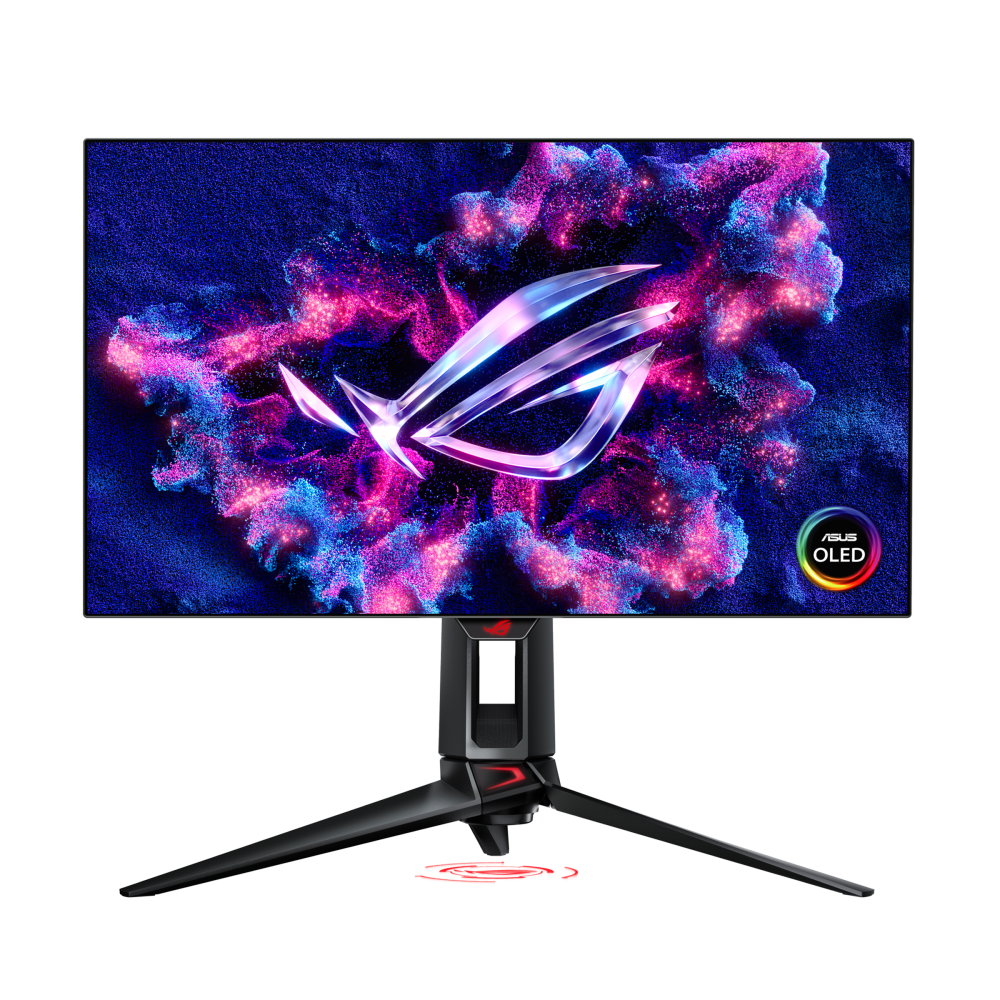
ASUS ROG Swift OLED PG34WCDN Review
Excellent
$1299.00
The fastest, sharpest 34-inch OLED yet - 360Hz motion plus RGB-stripe clarity that fixes OLED's oldest flaw. Worth the premium if you want the ceiling; MSI's same-panel X36 undercuts it. 9.0/10.
By GamePadSquire Test Desk · Updated Nov 14, 2026
As an Amazon Associate we earn from qualifying purchases made through links for ASUS ROG Swift OLED PG34WCDN.
Panel
34-inch Samsung Display 5th-gen QD-OLED (tandem), RGB-stripe subpixels, 1800R curve, matte with BlackShield film
Resolution
3440x1440 (UWQHD)
Refresh Rate
360Hz
Response Time
0.03ms GtG
Pros & Cons
Pros
- 360Hz at 3440x1440 - the fastest ultrawide motion you can buy, with 0.03ms GtG response
- RGB-stripe QD-OLED text clarity finally ends the fringing complaint that dogged OLEDs
- Genuinely brighter than previous-gen QD-OLED, with VESA DisplayHDR True Black 500
- DisplayPort 2.1 UHBR20 (80Gbps) plus USB-C with 90W power delivery and a KVM
- Neo Proximity Sensor and OLED Care Pro actively guard against burn-in
- Accurate color out of the box: 99% DCI-P3, true 10-bit, Delta E under 2
Cons
- $1,299 MSRP carries a premium over same-panel rivals like the MSI MPG 341CQR QD-OLED X36
- Amazon listings drift above MSRP - Best Buy and Newegg hold the $1,299 launch price closer
- Model naming collides with the 240Hz PG34WCDM - easy to order the wrong monitor
- No internal speakers
- OLED burn-in risk is inherent; early buyers report occasional panel QC variance
Overview
The 34-inch OLED ultrawide has spent three years running in place: the same Samsung panel, the same 240Hz ceiling, a different logo on the bezel. The ROG Swift OLED PG34WCDN, unveiled at CES 2026 and shipping in the US at $1,299, breaks that loop twice. It is one of the first monitors you can actually buy built on Samsung Display's fifth-generation QD-OLED — a tandem stack with an RGB-stripe subpixel layout — and it drives that panel at 360Hz, a refresh rate no other 34-inch consumer monitor offers today.
The reception has been unusually unified. RTINGS scores it 9.3/10 and currently lists it as the best ultrawide gaming monitor you can buy, citing its near-instantaneous response time, low input lag, and a real brightness step over the previous panel generation. Tom's Hardware awards 4.5/5 for what it calls new levels of speed and brightness. Even the more reserved takes — PowerUp Gaming's 4/5 calls it a very good ultrawide with smart refinements rather than a revolution — agree on the fundamentals. This is the panel the 34-inch class has been waiting for. The only real argument is about the price of admission.
Build Quality and Design
Physically, the PG34WCDN is a conventional ROG Swift with an unconventional surface. The 34-inch panel sits on an 1800R curve — the gentle arc the class has settled on as the compromise between immersion and text legibility — inside the usual slim three-sided bezel and a substantial height/pivot-adjustable stand. What distinguishes it is the finish: ASUS laminates what it calls BlackShield film over the QD-OLED, which the company claims boosts perceived black depth by up to 40 percent versus previous-gen panels and triples scratch resistance. QD-OLED's one ambient-light weakness has always been its raised blacks in bright rooms (the quantum dot layer reflects a purple-ish tint without a polarizer), so a film that deepens perceived blacks addresses a real complaint rather than a spec-sheet fantasy.
One practical warning before anything else: do not confuse this monitor with the PG34WCDM. That sibling model is a 240Hz, 800R-curve panel on an older QD-OLED generation, and online listings regularly blur the two — community threads are full of buyers discovering the difference after checkout. The PG34WCDN is the 360Hz, 1800R, fifth-generation panel. Read the last letter twice.
Early ownership reports also echo a familiar OLED pattern: most units are flawless, but a minority of first units arrive with defects and get replaced under warranty. Nothing systemic, but with a monitor this new, buying from a retailer with a painless return policy is cheap insurance.
Key Features
RGB-stripe subpixels are the headline. Traditional QD-OLED uses a triangular subpixel arrangement that renders fine text with colored fringing — the single most common complaint in three years of 34-inch OLED ownership. The fifth-generation panel arranges red, green, and blue subpixels in vertical stripes, like a good LCD, and the difference is immediately visible in owners' reports: upgraders from WOLED panels describe text as dramatically cleaner, and lab reviewers measure the sharpness gains directly. If you use an ultrawide for anything beyond games — code, documents, spreadsheets — this is the feature that matters most.
360Hz at 3440x1440 is the other one. Until this generation, ultrawide buyers choosing OLED capped out at 240Hz (175Hz before 2023); the PG34WCDN pushes the same width and height that competitive players use at 27 inches to a refresh rate that was recently exclusive to 1080p panels. ASUS pairs it with a 0.03ms GtG response time and DisplayHDR True Black 500 certification, with 99 percent DCI-P3 coverage, true 10-bit color, and Delta E under 2 — factory accuracy that Tom's Hardware measured as essentially reference-grade out of the box.
The port array is 2026-correct. DisplayPort 2.1 with UHBR20's full 80Gbps bandwidth future-proofs the connection side; HDMI 2.1 covers consoles and media players; and a USB-C input carries video plus 90W of power delivery, so a single cable drives a laptop while the built-in KVM shares your keyboard and mouse across machines. That dock-plus-monitor combination used to require buying MSI or LG; ASUS finally matches it at the top end.
Performance
Start with the speed, because that is what the $1,299 buys. RTINGS measures total response performance near the top of every chart the monitor appears in — motion at 360Hz on a near-instantaneous OLED is effectively artifact-free, with no overshoot to tune away — and records input lag at the lowest levels it has measured in this class. Tom's Hardware's testing agrees, noting record-low lag with smooth motion processing. In practical terms: at 3440x1440 and 360Hz, the PG34WCDN is one of the few ultrawides a competitive player can take seriously, because 1440p is a resolution modern GPUs can actually push at those frame rates. One r/OLED_Gaming owner's framing is hard to improve on: 360Hz at 1440p is the sweet spot for games like Overwatch — the speed of an esports panel with the field of view of an ultrawide.
That framing carries a GPU caveat. Feeding 4.9 million pixels at 360 frames per second is a flagship-GPU proposition; on anything less, the panel's headroom sits idle. The DisplayPort 2.1 connection at least means the cable will never be the bottleneck.
Brightness is the quieter upgrade. The tandem fifth-generation stack is measurably brighter than the fourth-gen panels in the AW3425DW class, and small HDR highlights pop harder than QD-OLED has managed before — RTINGS notes good overall brightness and HDR highlights that genuinely stand out. This is still OLED brightness, not mini-LED territory: full-screen SDR work runs in the low hundreds of nits, and a sun-flooded room remains QD-OLED's least flattering environment. But in a normal room, with the lights on, the PG34WCDN answers the two classic OLED objections — text and brightness — in one generation.
Software and Settings
ASUS's OLED housekeeping is the most mature in the business. OLED Care Pro runs pixel cleaning and compensation cycles automatically, dims static logos, and performs taskbar detection. The genuinely new trick is the Neo Proximity Sensor: the monitor watches for your presence and blanks to black when you walk away, which is the least annoying form of burn-in insurance yet devised. DisplayWidget Center handles firmware updates automatically and lets you export and import complete setting profiles — ASUS even suggests copying streaming pros' configurations directly. The OSD itself is conventional ROG fare: game visual modes, crosshair overlays, black-boost, and the usual assortment of settings most owners will touch once.
Pros and Cons
Pros
- 360Hz at 3440x1440 — the fastest ultrawide motion available, with 0.03ms response
- RGB-stripe text clarity finally ends OLED fringing complaints
- Genuinely brighter than previous-gen QD-OLED, with True Black 500 HDR
- DisplayPort 2.1 UHBR20 plus USB-C with 90W power delivery and a KVM
- Neo Proximity Sensor and OLED Care Pro guard against burn-in
- Accurate color out of the box — 99% DCI-P3, 10-bit, Delta E under 2
Cons
- $1,299 MSRP carries a premium over same-panel rivals like MSI's X36
- Amazon listings drift above MSRP; Best Buy and Newegg hold launch pricing closer
- Naming collides with the 240Hz PG34WCDM — verify before checkout
- No internal speakers
- Burn-in risk is inherent to OLED, and early units show occasional QC variance
Who Should Buy This
Buy it if you run a flagship GPU and want one monitor that does everything — competitive frame rates, ultrawide immersion, HDR films, and desk work with text that no older OLED matches. The USB-C/KVM pairing makes it equally strong as the single display anchoring a laptop-plus-desktop setup. Skip it if your GPU tops out below ~200 fps at 1440p ultrawide (the panel's headroom is wasted money), if your room is brightly sunlit most of the day, or if the budget math matters more than the last 120Hz — because Alienware's AW3425DW delivers about 80 percent of this experience for roughly 60 percent of the price.
Alternatives to Consider
The MSI MPG 341CQR QD-OLED X36 uses the same fifth-generation Samsung panel with the same 360Hz and typically lists around $1,100 — the value play on identical core hardware, trading ASUS's BlackShield film and proximity sensor for MSI's own AI care features. The Alienware AW3425DW is the budget-conscious answer: a Gen-2 QD-OLED at 240Hz that regularly sells for $649–$749 and remains the value benchmark in the class. If raw speed matters more than width, ASUS's own PG27AQDP delivers 480Hz at 27 inches for hundreds less. And the full field — including 45-inch 5K2K flagships — is laid out in the best ultrawide gaming monitors guide.
Verdict
Every component of the PG34WCDN was already the best available — the panel is simply the newest one, and ASUS wrapped it in the class's most complete feature set: 360Hz, RGB-stripe clarity, DisplayPort 2.1, a 90W USB-C KVM, and the industry's best burn-in care. The deductions are circumstantial rather than fundamental: a premium over an identical-panel rival, an Amazon markup that smart shoppers will route around, and a model name engineered to be misordered. None of it changes what the monitor does. 9.0/10 — Excellent, and the new benchmark for 34-inch gaming.
What the Experts Say
Professional review consensus for this product
Full Specifications
| Panel | 34-inch Samsung Display 5th-gen QD-OLED (tandem), RGB-stripe subpixels, 1800R curve, matte with BlackShield film |
|---|---|
| Resolution | 3440x1440 (UWQHD) |
| Refresh Rate | 360Hz |
| Response Time | 0.03ms GtG |
| HDR | VESA DisplayHDR True Black 500 |
| Color | 99% DCI-P3, true 10-bit, Delta E < 2 |
| VRR | G-SYNC Compatible, AMD FreeSync Premium Pro, VESA AdaptiveSync |
| Ports | DisplayPort 2.1 UHBR20 (80Gbps), HDMI 2.1, USB-C (90W PD, video), USB hub, KVM |
| Extras | BlackShield film (2.5x scratch resistance), Neo Proximity Sensor, DisplayWidget Center, ASUS OLED Care Pro |
| Warranty | 3 years including burn-in coverage |
The Verdict: Excellent
The fastest, sharpest 34-inch OLED yet - 360Hz motion plus RGB-stripe clarity that fixes OLED's oldest flaw. Worth the premium if you want the ceiling; MSI's same-panel X36 undercuts it. 9.0/10.
— GamepadSquire, November 2026
As an Amazon Associate we earn from qualifying purchases made through links for ASUS ROG Swift OLED PG34WCDN.
Related Buying Guide
Buying Guide
Best Ultrawide Gaming Monitors 2026: OLED Flagships, QD-OLED Value, and Budget Picks
Seven ultrawides worth buying in 2026 - from a $499 QD-OLED clearance steal to a 360Hz 5th-gen QD-OLED flagship - with verified press scores, real street prices, and the ultrawide-vs-dual-monitor answer.
Buying Guide
Best 4K Gaming Monitors (2026): OLED Flagships, Mini-LED Value, and What to Skip
4K at high refresh is finally mainstream — but the gap between a great 4K monitor and a mediocre one is wider than ever. Here's what HDR, panel type, and connectivity actually get you in 2026.