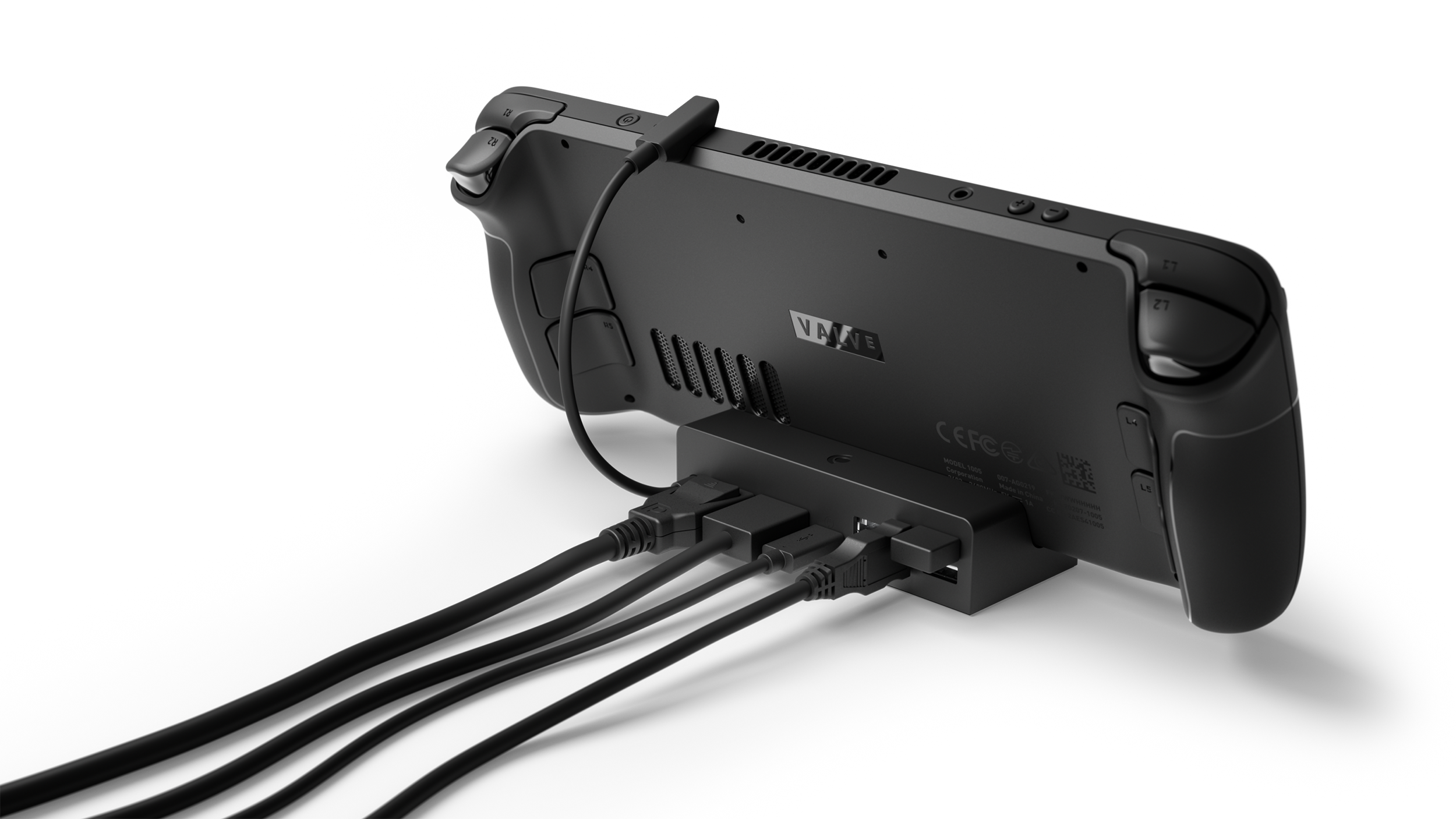
Valve
Valve Steam Deck Docking Station Review
Good
$89.99
The reference Steam Deck dock: best-in-class fit, DisplayPort + VRR support, easy firmware updates, and an included 45W charger — but the $89.99 premium over capable third-party docks is hard to justify on a tight budget.
ports
3x USB-A 3.1 Gen 1, HDMI 2.0, DisplayPort 1.4, Gigabit Ethernet, USB-C PD in
video
4K@60Hz / 1440p@120Hz (HDMI), up to 1440p@240Hz (DP, with MST)
charger
45W included
weight
120g (0.26 lbs)
Pros & Cons
Pros
- DisplayPort 1.4 plus HDMI 2.0 for flexible display output
- 45W charger included in the box
- Firmware updates through SteamOS — no Windows PC needed
- Gigabit Ethernet and three USB 3.1 Gen 1 ports
- Solid fit with rubber seat, built for both LCD and OLED Decks
Cons
- Premium price vs. $30-45 third-party docks
- Built-in USB-C cable is not detachable
- No M.2 SSD expansion slot
- Small base — stability relies on the cable lock
- Small minority of units report HDMI output failures
Overview
The Valve Steam Deck Docking Station is the official cradle for the Steam Deck, and after years of third-party docks filling the gap, it remains the reference point every competitor is measured against. Released in October 2022 at $89.99, it was delayed alongside the Deck itself, which gave cheaper rivals, JSAUX especially, a head start that they have never fully surrendered. What Valve shipped was a deliberately simple device: a compact black cradle with the ports most people actually need, a built-in right-angle USB-C cable, and a 45W charger in the box.
There is no mistaking what this dock is for. It exists to turn a handheld into a living-room console or a makeshift desktop, and it does that with a level of integration no third-party accessory can match. Firmware updates flow through SteamOS itself, the fit is engineered for both LCD and OLED Decks, and the included charger means the dock is permanently ready without stealing the one that travels with the handheld. The trade-off is price: at $89.99 it costs roughly double what a comparable JSAUX or Anker dock runs, and the entire community conversation about this accessory is essentially a debate about whether that premium is worth it.
For Steam Deck owners who want the most dependable, best-integrated dock available, the answer is usually yes. For everyone else, and there are a lot of "everyone elses" in the Steam Deck community, the value math is far less clear. This review digs into what the premium actually buys you, where the dock stumbles, and who should buy the official option versus who should save the money.
Build Quality and Design
The dock is small, 117 x 50.5 x 29 mm, and weighs just 120g, which makes it one of the most compact cradles on the market. It is molded from the same matte black plastic as the Deck itself, and the material choice is deliberate: where aluminum-bodied third-party docks can look flashier, Valve's dock matches the handheld's industrial, understated aesthetic. Press reviews consistently describe the build as feeling like a genuine extension of the Deck rather than an afterthought accessory.
The design centers on a shallow cradle with a molded rubber seat. The Deck rests against a small lip that is angled to sit flush with the display, and rubber pads guide the handheld into position. Owners frequently note that the Deck feels planted in the dock, there is no wobble, and the flexible right-angle USB-C cable locks everything together once connected. Because the cradle is open in front, the Deck's screen and controls stay fully accessible while docked, which is a meaningful advantage over the Nintendo Switch dock's enclosed design. Adjusting a setting or pairing a Bluetooth controller doesn't require pulling the Deck out.
The one recurring design criticism is the size. The dock's footprint is small enough that several reviewers initially worried about the Deck tipping forward, and PCMag flagged the dock as "a little too small" relative to the Deck's near-foot-wide body. In practice, the cable connection holds the Deck secure, and community feedback over years of use suggests tipping is more a theoretical concern than a real one. The built-in USB-C cable, however, is not detachable, if it gets damaged, the entire dock is affected, and that is a genuine long-term durability question that doesn't exist on docks with replaceable cables.
Key Features
Ports. The back panel carries the full set: three USB-A 3.1 Gen 1 ports, HDMI 2.0, DisplayPort 1.4, Gigabit Ethernet, and a USB-C power input. That is the same practical port selection as the best third-party docks, but the DisplayPort 1.4 output is the differentiator, most sub-$50 docks ship HDMI-only.
Display output. HDMI tops out at 4K/60Hz or 1440p/120Hz, while DisplayPort 1.4 technically supports up to 4K/120Hz or 1440p/240Hz. Real-world gaming rarely approaches those ceilings, the Deck's APU simply isn't built for 4K, but the DP port matters for two practical reasons: monitors with only DisplayPort inputs work natively, and higher refresh-rate monitors can actually run at their native refresh. Reddit threads are full of owners who upgraded from HDMI-only docks specifically to unlock 144Hz or VRR on their monitors.
MST and dual displays. Through DisplayPort's Multi-Stream Transport, the dock can drive two external displays in desktop mode. PCGamesN noted this feels like overkill for a handheld, but for anyone using the Deck as a desktop Linux machine, dual-monitor support is a genuinely useful productivity feature.
45W charger included. Valve bundles the same 45W USB-C charger that ships with the Deck. This is a bigger deal than it sounds: it means one charger can live permanently with the dock while the Deck's other charger travels. Community feedback repeatedly cites this as one of the strongest reasons to choose the official dock over cheaper rivals.
Firmware updates via SteamOS. This is the dock's signature advantage. When Valve pushes dock firmware updates, they arrive through the same SteamOS update channel as the Deck's system updates. Third-party docks require either a Windows PC and a vendor tool, or nothing at all, many never get updated. PCMag highlighted this as the feature that makes the official dock stand out, and it has paid off in practice: FreeSync support, which wasn't enabled at launch, arrived via a dock firmware update, and display compatibility improvements have shipped the same way.
Performance
Performance for a dock is measured in reliability and output quality, and here the official dock earns its reputation. PCMag tested it with an Xbox Elite controller across a range of games on a TV and reported no noticeable added latency. The video pipeline is stable, once a display is connected and the dock firmware is current, output is consistent across HDMI and DisplayPort.
The FreeSync story is worth calling out specifically. At launch, the feature was listed as coming soon, and Tom's Hardware noted its absence. Valve later delivered it via firmware, and owners with VRR-capable displays report it working, though a minority have struggled to get VRR working with specific TVs, and those reports are scattered enough to suggest display-side quirks rather than a dock-wide flaw.
Where the dock does not perform is as a charging powerhouse. It passes through 45W, which is exactly what the Deck demands, the Deck is capped at 45W charging, so this is a non-issue for the Deck itself. But unlike some third-party docks that advertise 100W pass-through for laptops or other handhelds, the official dock is single-minded: it charges the Deck, full stop. It can also operate entirely without external power, a quirk that sets it apart from many third-party docks, though when running unpowered, USB ports throttle their throughput.
The reliability picture deserves a straight assessment. The overwhelming majority of owners report years of trouble-free service; the dock is frequently described as the most dependable part of a Deck setup. That said, there is a persistent minority of reports describing HDMI output failures, units that stop sending video to a display after weeks or months of use, with some owners needing reboots or re-seating to recover. The failure reports are not as common as the JSAUX complaints that dominate r/SteamDeck's "best dock" threads, but they exist, and Valve's return window on hardware is limited, so it is worth buying from a retailer with a generous policy.
Pros and Cons
Pros:
- DisplayPort 1.4 output, unlocks 144Hz and VRR on monitors that HDMI-only docks can't drive
- Firmware updates through SteamOS, with FreeSync and compatibility fixes delivered automatically
- 45W charger included in the box, one charger lives with the dock, one travels with the Deck
- Excellent fit and finish; rubber seat protects both LCD and OLED Decks, and the open cradle keeps the screen usable while docked
- Gigabit Ethernet and three USB 3.1 Gen 1 ports cover desktop-mode needs
- Can run without external power in a pinch
Cons:
- $89.99 is a steep premium over functionally similar docks at $30-45
- Built-in USB-C cable is not replaceable, a damaged cable is a dead dock
- No M.2 SSD expansion slot, which the JSAUX M.2 dock offers at a similar price
- Small footprint; some owners worry about stability, though the cable lock mitigates it
- A persistent minority of reliability reports mention HDMI output failures
Who Should Buy This
The official dock is the right choice for Steam Deck owners who want the accessory to disappear into the background. If the Deck lives in a dock on a desk or entertainment center, and the priority is "it just works", with automatic firmware updates, a proper DisplayPort connection for a high-refresh monitor, and a charger that never has to be swapped, the $89.99 is easy to justify. Owners who upgraded from third-party docks consistently cite DisplayPort, VRR support, and the included charger as the reasons they'd never go back.
It is also the pick for anyone who wants to minimize troubleshooting. The Steam Deck community's dock discussions are dominated by third-party quirks: JSAUX docks that need unplugging and replugging to output video, docks that can't keep the Deck charged under load, Ethernet ports that negotiate at 10Mbps, and firmware that requires a Windows PC to update. The official dock sidesteps essentially all of that.
Skip it if the Deck is primarily a travel device. Owners who only occasionally want to plug into a TV, and especially those who already own a powered USB-C hub, will be served perfectly well by cheaper options. Budget shoppers should also look elsewhere: at half the price, the JSAUX HB0603 covers the same core use cases with only DisplayPort and VRR as the real sacrifices. And if expanding storage via the dock matters, the official dock simply doesn't do it, the JSAUX M.2 dock is the play there.
Alternatives to Consider
JSAUX 6-in-1 Docking Station (HB0603, ~$36): The most popular third-party dock and our previous pick for value. It matches the official dock on HDMI 2.0 4K/60Hz, adds 100W pass-through charging for other devices, and costs less than half as much. What you give up: no DisplayPort, no VRR, firmware updates require a Windows PC, and community feedback shows a higher rate of video-output and charging quirks.
JSAUX M.2 Docking Station (~$50-60): The official dock's closest functional rival for power users. Same core ports plus an internal M.2 slot for expanding the Deck's storage without opening the case. Loses the firmware-update convenience and the included charger.
Anker USB-C hubs (various, $25-45): For owners who want portability rather than a cradle, a compact hub with HDMI and pass-through charging covers TV output without the dock footprint. The trade-off is no stand, no Ethernet on the cheapest models, and the same firmware caveats as other third-party options.
Verdict
The Valve Steam Deck Docking Station is the best-made, best-integrated dock you can buy for the Deck, and the press consensus backs that up: PCGamesN scored it 9/10, calling it a pricey but "almost perfect pairing" for the handheld, while PCMag (3.5/5) and Tom's Hardware (3/5) both praised the execution while questioning the value. That split, near-universal praise for the product, genuine disagreement about the price, is exactly the conversation owners are having too.
As a piece of hardware, it earns an 8/10. The fit is flawless, the DisplayPort and VRR support genuinely matter to a meaningful slice of owners, the firmware-update model is the best in the category, and the included charger removes the biggest annoyance of dock ownership. The premium price is the one thing that keeps it from a higher score, along with a non-replaceable cable and the scattered reliability reports that prevent it from being a completely uncontroversial recommendation.
Buy it if you want the dock that feels like it was designed for the Deck, because it was. Buy it if you have a high-refresh or DisplayPort-only monitor, or if you're tired of third-party dock troubleshooting. Skip it if you're on a budget, if the Deck never leaves your hands, or if you already own a powered USB-C hub, for those use cases, the JSAUX at $36 does 80% of the job for 40% of the price.
What the Experts Say
Professional review consensus for this product
Full Specifications
| ports | 3x USB-A 3.1 Gen 1, HDMI 2.0, DisplayPort 1.4, Gigabit Ethernet, USB-C PD in |
|---|---|
| video | 4K@60Hz / 1440p@120Hz (HDMI), up to 1440p@240Hz (DP, with MST) |
| charger | 45W included |
| weight | 120g (0.26 lbs) |
| dimensions | 117 x 50.5 x 29 mm |
| firmware | SteamOS updates, FreeSync via update |
| release | October 2022 |
The Verdict: Good
The reference Steam Deck dock: best-in-class fit, DisplayPort + VRR support, easy firmware updates, and an included 45W charger — but the $89.99 premium over capable third-party docks is hard to justify on a tight budget.
— GamepadSquire, August 2026
Related Buying Guide
Buying Guide
Best PC Gaming Handhelds 2026: The Definitive Buyer's Guide
The 2026 handheld PC market explained tier by tier: Steam Deck OLED, ROG Xbox Ally X, Legion Go S, ROG Ally X, Legion Go, and MSI Claw 8 AI+ — with the new Z2 Extreme flagship, SteamOS off-Valve for the first time, and who each device is for.
Buying Guide
Best Handheld Gaming Consoles 2026: Steam Deck, Switch 2, and Every Pick In Between
The head-term answer for 2026: which handheld gaming console to buy across PC handhelds, the Nintendo Switch 2, and retro emulation picks — with verified review scores and post-price-hike pricing.


